Topic: Unified Product Traceability

Unified Product Traceability forms part of the Quality Management module. The UPT framework aims to help businesses comply with evolving global product traceability regulations, starting with the FDA’s FSMA 204 and the EU’s Digital Product Passport (EU-DPP). This functionality enables users to capture, manage, and report Key Data Elements (KDEs) linked to Critical Tracking Events (CTEs) across their supply chain. The expansion of Syspro 's lot and serial traceability capabilities equips businesses to meet current and future regulations, improve visibility, and build trust in their products.

Exploring
 Where it fits in?
The Unified Product Traceability (UPT) project introduces a scalable and extensible traceability framework within Syspro. Rather than building separate, hard-coded solutions for each regulation, UPT provides a single configurable model that can support a variety of legislative and industry traceability mandates, such as:
-
The Food Safety Modernization Act (FSMA) Section 204 (USA)
-
The European Union Digital Product Passport (EU-DPP)
By embedding a unified product traceability capability into Syspro, manufacturers and distributors can ensure ongoing compliance with emerging global traceability mandates. This not only reduces compliance risk and manual effort but also enhances product visibility, supports faster recalls, and builds trust with consumers and regulators. The solution delivers future-proof value by providing a scalable traceability framework adaptable to evolving standards.
Benefits
-
Compliance with global product traceability requirements
-
Capture, manage and report key data elements (KDEs) linked to critical tracking events (CTEs) across your supply chain
-
Faster and more accurate traceability reporting
-
Reduced manual compliance work and audit preparation
-
Proactive readiness for upcoming regulations
-
Greater supply chain transparency and product lifecycle insight
-
A future-ready traceability architecture designed to scale across markets and mandates
Functionality
Unified Product Traceability will ensure that you can:
-
Record the required data for the tracking critical tracking events (CTEs)
-
Record with a new program called Unified Product Traceability Tracking
-
-
Report all required information in a “Electronic Sortable Spreadsheet”
-
Report all data via an “API” or Business Object
-
Maintain records of all required information for the specified 2 years or more
Functionality will also be delivered to ensure you can manage future expansion. Functionality will be delivered to support:
-
Import functionality to import the initial dataset as required by either FSMA or DPP
-
Configuration to establish the required KDEs by CTE by provided scenarios
-
Maintain “Critical Tracking Events” to add to these if certain rules are revised
-
Maintain “key data elements” per “CTEs” and scenarios to add to these if rules are revised
-
Query and Maintain CTEs and its associated KDEs in case any adjustments are needed from the initial capture and to allow for manual capture of KDEs
The programs related to this feature are accessed from the Program List of the Syspro menu:
- Program List > Quality Management
Terminology
Product and Data Regulations
The following regulations require capturing and disclosing product data across your supply chain, involving food safety and sustainability.
Food Safety Modernization
The Food Safety Modernization Act (FSMA) Section 204 is a regulation issued by the U.S. Food and Drug Administration (FDA) to improve food traceability and strengthen response to foodborne illness outbreaks.
EU Digital Product Passport
The EU-DPP forms part of the European Green Deal and Circular Economy Action Plan. It requires manufacturers to disclose detailed product-level data including material composition, sustainability, and recycling instructions in a digital passport format. This data is used to support sustainability goals and enable downstream users to make informed decisions about reuse, repair, and recycling.
Critical Tracking Event (CTE)
A list of events for which data must be recorded. A CTE is a point in the supply chain where product data must be recorded to meet a traceability regulation. In UPT, each CTE can be linked to the required point of the manufacturing or distribution process.
CTE stands for critical tracking event, also referred to as a critical traceability element. The terms have the same meaning and are used interchangeably.
Key Data Elements (KDE)
A list of data elements which must be recorded and linked to an associated CTE. A KDE is the specific piece of data captured for a CTE. Each CTE has its own set of KDEs, which you can adapt as requirements change.
Starting
Prerequisites
Setup Options
To use this feature, the following setup option(s) must be enabled/defined:
Quality Management Configuration
Setup Options > Configuration > Manufacturing > Quality Management
-
Unified product traceability
Quality Management History
Setup Options > History > Manufacturing > Quality Management
-
Unified product traceability entries
Electronic Signatures
To use this feature, the following eSignatures must be defined accordingly in the Electronic Signature Configuration Setup program (as this allows for the various functions in the related programs):
-
UPT Critical Traceability Element added e.net
-
UPT Critical Traceability Element changed e.net
-
UPT Critical Traceability Element deleted e.net
-
UPT Key Data Element added e.net
-
UPT Key Data Element changed e.net
-
UPT Key Data Element deleted e.net
-
UPT Critical Traceability Location added e.net
-
UPT Critical Traceability Location deleted e.net
-
UPT Configure Critical Traceability Element e.net
-
UPT Data added e.net
-
UPT Data changed e.net
-
UPT Purge e.net
-
UPT Archive e.net
-
UPT Critical Traceability Element added
-
UPT Critical Traceability Element changed
-
UPT Critical Traceability Element deleted
-
UPT Key Data Element added
-
UPT Key Data Element changed
-
UPT Key Data Element deleted
-
UPT Critical Traceability Location added
-
UPT Critical Traceability Location deleted
-
UPT Configure Critical Traceability Element
-
UPT Data added
-
UPT Data changed
-
UPT Purge
-
UPT Archive
Licensing
To use this feature, the following module(s) must be installed according to the terms of your software license agreement:
-
Quality Management
Security
You can secure this feature by implementing a range of controls against the affected programs. Although not all these controls are applicable to each feature, they include the following:
- You restrict operator access to activities within a program using the Operator Maintenance program.
- You can restrict operator access to the fields within a program (configured using the Operator Maintenance program).
- You can restrict operator access to functions within a program using passwords (configured using the Password Definition program). When defined, the password must be entered before you can access the function.
- You can restrict access to the eSignature transactions within a program at operator, group, role or company level (configured using the Electronic Signature Configuration Setup program). Electronic Signatures provide security access, transaction logging and event triggering that gives you greater control over your system changes.
- You can restrict operator access to programs by assigning them to groups and applying access control against the group (configured using the Operator Groups program).
- You can restrict operator access to programs by assigning them to roles and applying access control against the role (configured using the Role Management program).
Solving

Why don't you drop us a line with some useful information we can add here?
Using
Process
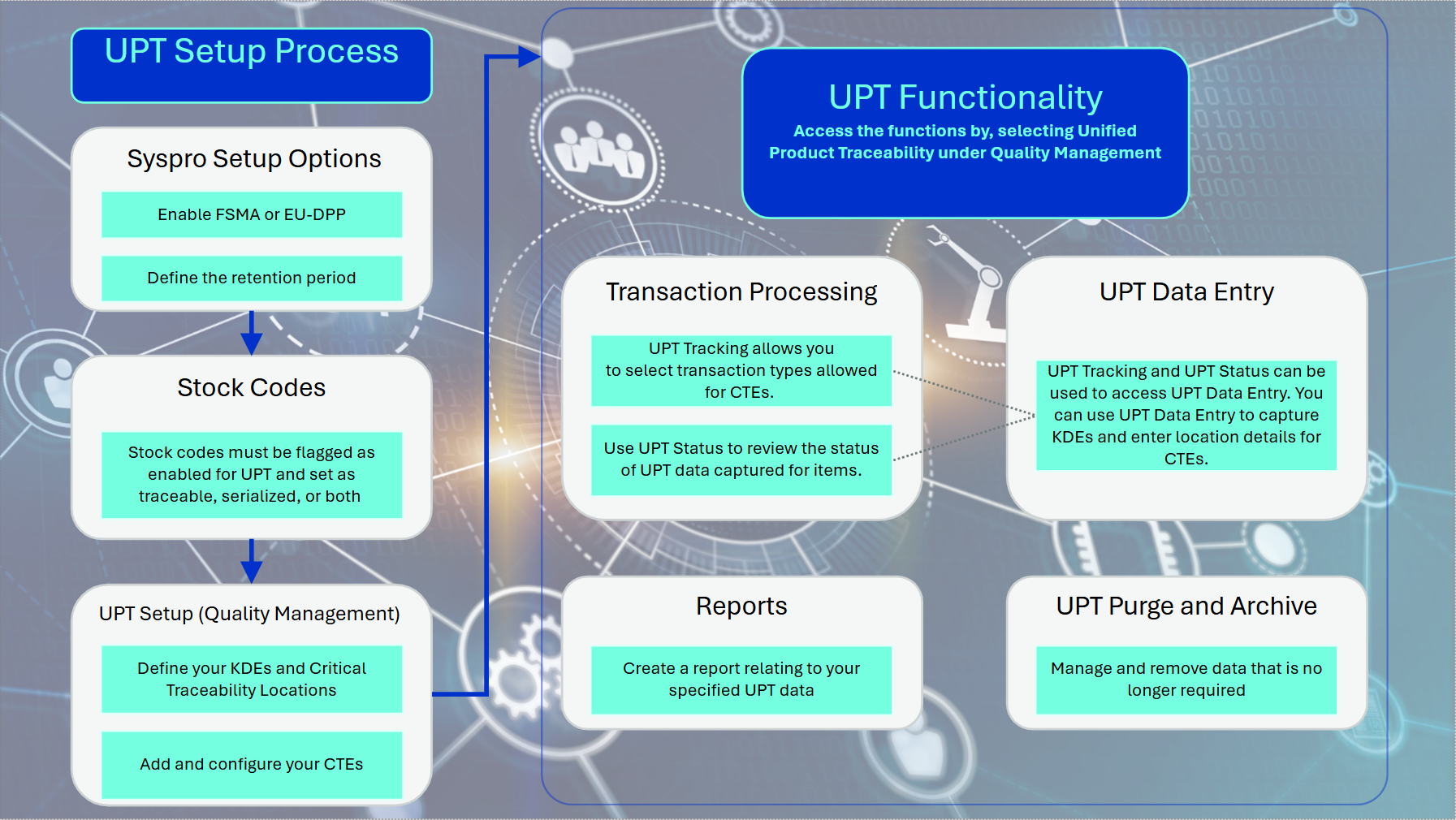
UPT Setup Process flow
-
In Setup Options define the following:
-
Unified product traceability as FSMA or ED-DPP (Setup Options > Configuration > Manufacturing > Quality Management)
-
Unified product traceability entries as the length of your retention period (Setup Options > History > Manufacturing > Quality Management)
-
-
Enable the following fields within the Stock Code Maintenance program:
-
UPT required checkbox.
Ensure the stock codes are traceable and/or serialized
-
-
Use the following programs to define :and configure the required critical traceability elements and key data elements:
-
Use the Key Data Element program to define your intended KDEs.
-
Use the Critical Traceability Element program to add your required CTEs.
-
Use the Critical Traceability Locations program to add your intended CTE locations of the defined CTEs and KDEs.
-
Use the Configure Critical Traceability Element to configure your CTEs by linking them to the selected KDEs and critical traceability locations.
-
UPT Functionality1. Transaction processing:
-
You can use the Unified Product Traceability Status program to review the status of the captured UPT data.
-
Use the Unified Product Traceability Tracking program to select transactions for the relevant transaction types allowed for CTEs.
-
The Unified Product Traceability Data Entry program can be accessed from both the Unified Product Traceability Status and Unified Product Traceability Tracking programs to capture KDEs and select and enter location details for CTEs.
-
2. For UPT data that is no longer required, use the UPT Purge and Archive program to manage or remove data by archiving or purging it.
3. Use the report function to build and customize a report from the selected UPT data.
Status Codes
Traceability status
The following indicates the possible status codes of the captured UPT data, using the Unified Product Traceability Status program.
| Status | Description |
|---|---|
|
N - Incomplete |
This indicates that the further information is required for your intended traceability element. The data can be added using Unified Product Traceability Tracking |
| Y - Complete |
This indicates that the intended traceability element contains the required data. |
Affected programs
The following indicates areas in the product that may be affected by implementing this feature:
Setup programs
Stock Code Maintenance
Program List > Inventory > Setup
This program lets you capture and maintain details of stock items that your company uses or sells.
-
We've added the new UPT required checkbox in the Unified product traceability section of the Tracking pane.
Critical Traceability Element
Program List > Quality Management > Unified Product Traceability > Setup
This program lets you add, change and delete critical traceability elements.
Key Data Element
Program List > Quality Management > Unified Product Traceability > Setup
This program lets you add, change and delete key data elements.
Critical Traceability Locations
Program List > Quality Management > Unified Product Traceability > Setup
This program lets you add and delete critical traceability locations.
Configure Critical Traceability Element
Program List > Quality Management > Unified Product Traceability > Setup
This program lets you configure key data elements and critical traceability locations for critical traceability elements.
Period End programs
UPT Purge and Archive
Program List > Quality Management > Unified Product Traceability
This program lets you purge and archive UPT data as well as archive non-current CTE configurations.
Batch programs
Unified Product Traceability Status
Program List > Quality Management > Unified Product Traceability > Transaction Processing
This program lets you review the status of UPT data captured for items. You can choose the critical traceability elements to include as well as which items.
Unified Product Traceability Tracking
Program List > Quality Management > Unified Product Traceability > Transaction Processing
This program lets you select lot or serial transactions for the relevant transaction types allowed for critical traceability elements.
Unified Product Traceability Data Entry
Accessible from the UPT Data Entry function in the Transaction Review pane of the Unified Product Traceability Tracking program or from the Change Selected UPT Data function in the Traceability Status pane of the Unified Product Traceability Status program.
This program lets you capture key data elements as well as select and enter location details for critical traceability elements.
Affected business objects
The following indicates the business objects that are affected by this feature:
Setup objects
Inventory Stock Code Maintenance
The Inventory Stock Code Maintenance business object is used to add, update or delete inventory stock codes.
Additional information
When defining stock codes, information can be captured about its replenishment, production, tracking and sales. If required, any additions, deletions and amendments to the stock file can be retained along with the name of the operator who made them by selecting the SYSPRO Inventory Setup option: Amendment journals required (Setup | Distribution Setup | Inventory | General tab).
Additionally, triggers can be defined (File | Customization | Trigger Programs) to automatically execute multiple actions such as running a NetExpress program, running an application or writing to the Message Inbox when a stock code is added, updated or deleted.
When adding a stock code and a value is not supplied against a non-mandatory element, the element value will default to that defined against the Global Defaults in SYSPRO Stock Code Maintenance. Alternatively, if Product Class Defaults have been defined in SYSPRO Stock Code Maintenance and a product class is supplied in the parameter ApplyProductClassDefault, these defaults will be applied.
The method used dictates which maintenance function is being performed on stock codes.
-
Add - Adds new stock code
-
Update - Updates existing stock code
-
Delete - Deletes existing stock code
Warehouses in which the stock code is stocked cannot be added or changed using this business object. In addition, the entry against the element WarehouseToUse is not validated. To define the stock warehouse records, use Inventory Stock/Warehouse Maintenance.
Only the stock code's list price code can be defined using this business object. To define both the list price record and additional price codes against the stock code, use Inventory Price Maintenance.
Critical Traceability Element Setup
The Critical Traceability Element Setup business object allows traceability elements to be added, changed, and deleted, and supports configuration of the transactions that apply to each element.
Key Data Element Setup
The Key Data Element Setup business object enables key data elements to be added, changed, and deleted.
Critical Traceability Location Setup
The Critical Traceability Location Setup business object allows critical traceability locations to be added and deleted.
Transaction objects
Configure Critical Traceability Element
The Configure Critical Traceability Element business object configures key data elements and critical traceability locations against critical traceability elements.
Unified Product Traceability Data Entry
The Unified Product Traceability Data Entry business object captures data against key data elements and critical traceability locations for critical traceability elements applied to lot or serial transactions.
UPT Purge and Archive
The UPT Purge and Archive business object allows Unified Product Traceability data to be purged or archived.
Query objects
Unified Product Traceability Data Entry
The Unified Product Traceability Data Entry business object outputs data captured against key data elements and critical traceability locations for lot or serial transactions.
Copyright © 2026 Syspro PTY Ltd.