Program: Critical Traceability Element

This program lets you add, change and delete critical traceability elements.
Exploring
Starting
 Security
eSignatures
Security
eSignatures
You can restrict access to the eSignature transactions within a program at operator, group, role or company level (configured using the Electronic Signature Configuration Setup program).
Electronic Signatures provide security access, transaction logging and event triggering that gives you greater control over your system changes.
UPT Critical Traceability Element added
Controls access to the adding of a critical traceability element in the Critical Traceability Element program.
UPT Critical Traceability Element changed
Controls access to the changing (updating the details) of a critical traceability element in the Critical Traceability Element program.
UPT Critical Traceability Element deleted
Controls access to the deleting of a critical traceability element in the Critical Traceability Element program.
Solving

Why don't you drop us a line with some useful information we can add here?
Using
Process
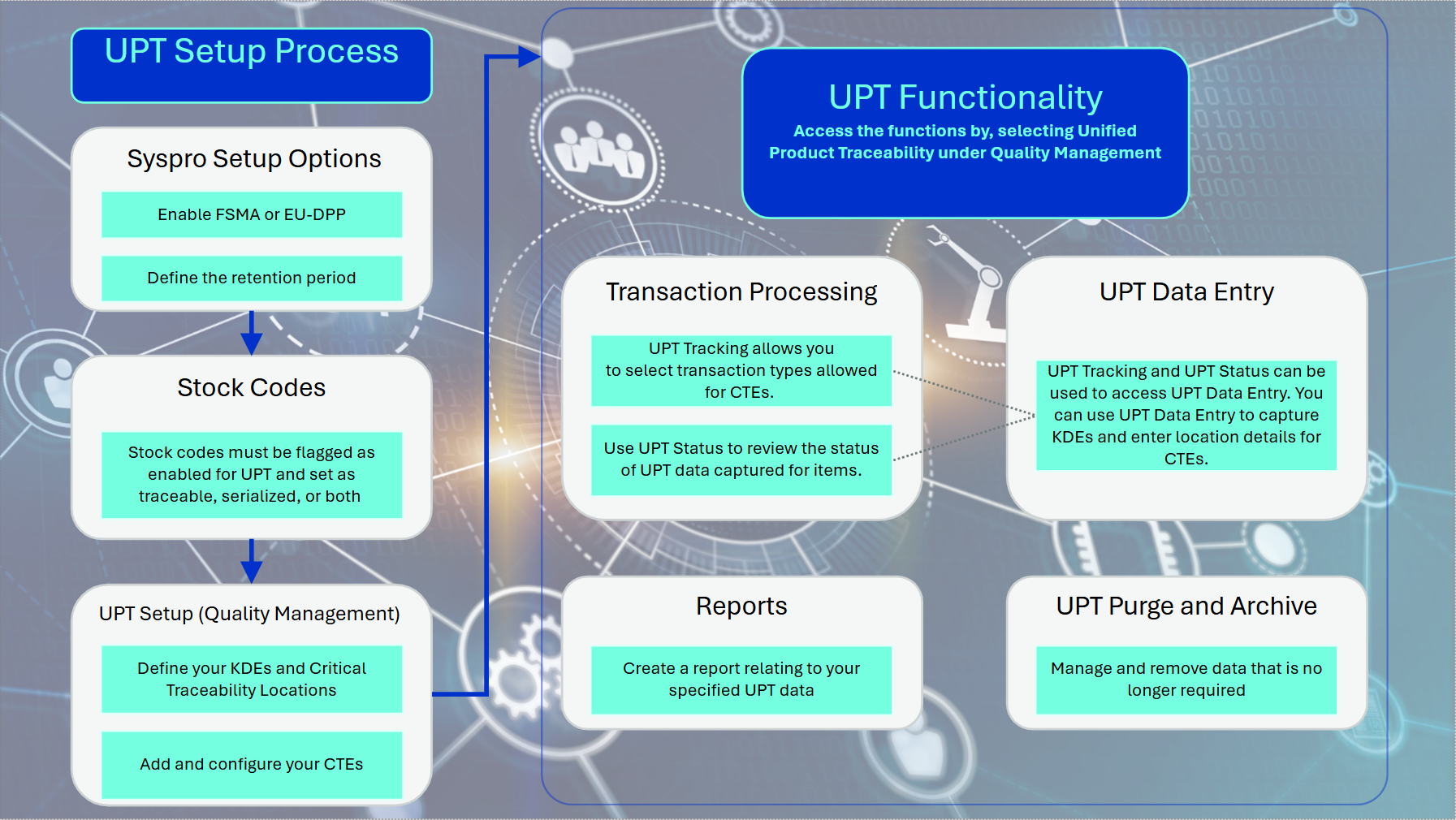
UPT Setup Process flow
-
In Setup Options define the following:
-
Unified product traceability as FSMA or ED-DPP (Setup Options > Configuration > Manufacturing > Quality Management)
-
Unified product traceability entries as the length of your retention period (Setup Options > History > Manufacturing > Quality Management)
-
-
Enable the following fields within the Stock Code Maintenance program:
-
UPT required checkbox.
Ensure the stock codes are traceable and/or serialized
-
-
Use the following programs to define :and configure the required critical traceability elements and key data elements:
-
Use the Key Data Element program to define your intended KDEs.
-
Use the Critical Traceability Element program to add your required CTEs.
-
Use the Critical Traceability Locations program to add your intended CTE locations of the defined CTEs and KDEs.
-
Use the Configure Critical Traceability Element to configure your CTEs by linking them to the selected KDEs and critical traceability locations.
-
UPT Functionality1. Transaction processing:
-
You can use the Unified Product Traceability Status program to review the status of the captured UPT data.
-
Use the Unified Product Traceability Tracking program to select transactions for the relevant transaction types allowed for CTEs.
-
The Unified Product Traceability Data Entry program can be accessed from both the Unified Product Traceability Status and Unified Product Traceability Tracking programs to capture KDEs and select and enter location details for CTEs.
-
2. For UPT data that is no longer required, use the UPT Purge and Archive program to manage or remove data by archiving or purging it.
3. Use the report function to build and customize a report from the selected UPT data.
Referencing
Menu and Toolbar


 Traceability Element
Enter the traceability element code that you want to maintain or use the browse function to search for an existing code using the Critical Traceability Element program..
Critical Traceability Element Details
| Field | Description |
|---|---|
| Traceability Element |
This indicates the traceability element you are currently maintaining. |
| Configured Version |
This displays the configured version of the critical traceability element. |
| Description |
Enter the description for the traceability element. |
| Job Receipts |
Select this option to include job receipts, including backflushing, as a transaction type for this traceability element. |
| Job Issues |
Select this option to include job issues, including backflushing components, as a transaction type for this traceability element. |
| Purchase Order Receipts |
Select this option to include purchase order receipts as a transaction type for this traceability element. |
| Inventory Receipts |
Select this option to include inventory receipts as a transaction type for this traceability element. |
| Inventory Issues |
Select this option to include inventory issues as a transaction type for this traceability element. |
| Warehouse Transfers |
Select this option to include warehouse transfers, for this traceability element. |
| Bin Transfers |
Select this option to include bin transfers as a transaction type for this traceability element. |
| Sales Orders |
Select this option to include sales orders as a transaction type for this traceability element. |
| Dispatch Notes |
Select this option to include dispatch notes as a transaction type for this traceability element. |
Copyright © 2026 Syspro PTY Ltd.