Topic: Contact Management System

The Contact Management System feature lets you manage information related to the individuals and entities involved in your business interactions. This includes SYSPRO customers, suppliers, prospective clients (prospects), leads, consultants, competitors, and even internal colleagues within your organization.

Exploring
 Where it fits in?
Benefits
Where it fits in?
Benefits
-
Calendar and contact synchronization
-
Effortless email management
-
Streamlined and organized communication
-
Comprehensive insights into business relationships
Functionality
A holistic 360-degree perspective within the Contact Management System and seamless integration with Microsoft Outlook allows you to effortlessly add and update contact details, enhance responsiveness to customer needs, streamline your efforts by eliminating duplication, and boost customer retention. You can record essential details from phone calls and emails, schedule appointments and associate them with specific contacts, set reminders for important dates, and create a to-do list for tasks.
The programs related to this feature are accessed from the Program List of the Syspro menu:
- Program List > Contact Management
Terminology
Account (CMS)
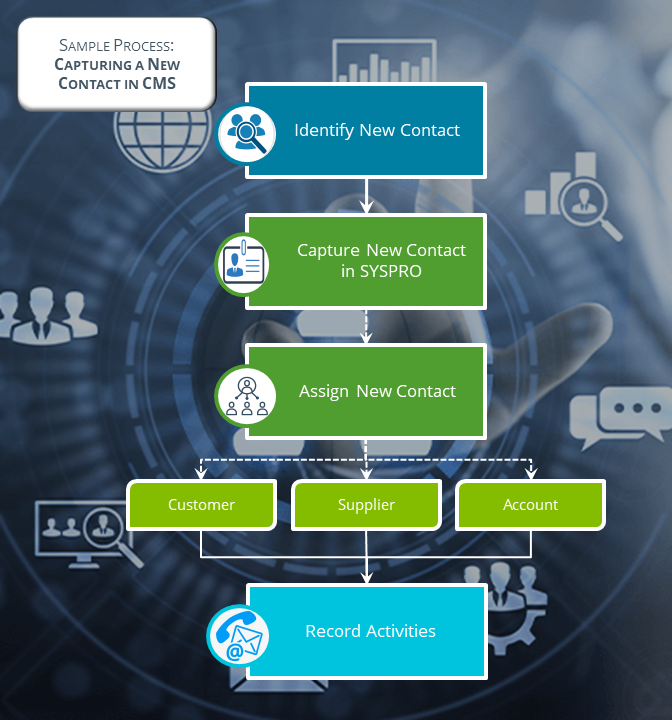
Accounts in the Contact Management System let you manage your contacts, such as customers and suppliers (existing or potential), leads, colleagues or any other internal or external contact person.
Contacts assigned to prospective accounts can later be converted into customers and suppliers.
Activities (CMS)
Activities in the Contact Management System are events that are recorded against your contacts, such as phone calls, emails, meetings and tasks.
Contacts (CMS)
Contacts are the customers, suppliers, and accounts that are connected to the organizations with which you do business.
Contact Management System (CMS)
SYSPRO's Contact Management System enables you to store and query information about the people you interact with in the business environment. It assists you in tracking communications, appointments, activities, etc., between the touchpoints of an organization.
Starting
Prerequisites
The following configuration options in Syspro may affect processing within this program or feature, including whether certain fields and options are accessible.
To use this feature, the following setup option(s) must be configured:
Setup Options
To use this feature, the following setup option(s) must be enabled/defined:
Setup Options > Preferences > Contact Management > Activities
-
Follow up flag captions
-
Activity change preferences
-
Activity selection criteria
-
-
User-defined fields
Setup Options > Preferences > Contact Management > Contacts
-
Classification captions
-
Property captions
-
Copy contact details
Setup Options > Preferences > Contact Management > Defaults
-
Defaults
-
Calendar
-
Licensing
To use this feature, the following module(s) must be installed according to the terms of your software license agreement:
-
Contact Management System
Deploying
Follow these steps to successfully configure the Contact Management System:
-
Use the Contact Management Setup Wizard to add your existing contact details in SYSPRO to the Contact Management System.
-
Once you've successfully run the wizard, define the defaults and preferences within the Setup Options program:
-
Activity preferences (Setup Options > Preferences > Contact Management > Activities)
-
Contact preferences (Setup Options > Preferences > Contact Management > Contacts)
-
Defaults (Setup Options > Preferences > Contact Management > Defaults)
-
-
Specify your own wording for certain fields (Setup Options > User Defined Fields > Contact Management > Accounts).
-
Use the Operator Maintenance program to select the relevant contact management operator activities.
-
Use the Generic Browse and Maintenance program to setup the various classifications used to categorize contacts in the Contact Management System.
Security
You can secure this feature by implementing a range of controls against the affected programs. Although not all these controls are applicable to each feature, they include the following:
- You restrict operator access to activities within a program using the Operator Maintenance program.
- You can restrict operator access to the fields within a program (configured using the Operator Maintenance program).
- You can restrict operator access to functions within a program using passwords (configured using the Password Definition program). When defined, the password must be entered before you can access the function.
- You can restrict access to the eSignature transactions within a program at operator, group, role or company level (configured using the Electronic Signature Configuration Setup program). Electronic Signatures provide security access, transaction logging and event triggering that gives you greater control over your system changes.
- You can restrict operator access to programs by assigning them to groups and applying access control against the group (configured using the Operator Groups program).
- You can restrict operator access to programs by assigning them to roles and applying access control against the role (configured using the Role Management program).
Solving
Warning messages
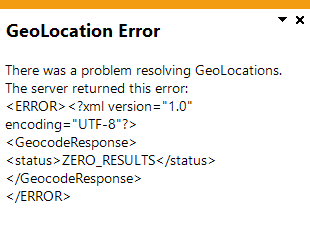
GeoLocation Error
Cause
This message appears after selecting the Resolve GeoLocation from address hyperlink within the Suppliers program, if either of the following apply:
-
The address information entered can't be converted into the corresponding co-ordinates.
-
Address information has not been provided.
Solution
To populate this field with the correct co-ordinates, ensure that you provide as much information related to the account's physical address as possible.
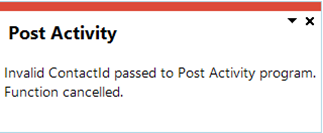
Post Activity - Invalid ContactID
Cause
This message is displayed if you access the Contact Activity Posting program and a default contact hasn't been linked to the current operator.
Solution
To resolve this, link your operator code to a valid contact by following these steps:
-
Access the Operator Maintenance program and select the operator for which you want to create a default contact.
-
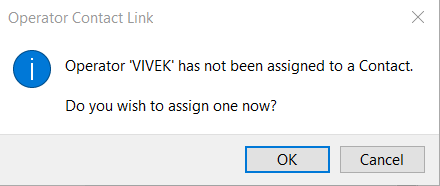
Select the Contact menu and then select Contact details.
The following warning message is displayed:
-
Select Ok.
The Contacts window is displayed.
-
Select the default contact for the operator in the listview and click on Select.
The default contact is the account that is associated with the operator, e.g. the default contact for the Admin operator could be John Doe.
Using
 Affected programs
The following indicates areas in the product that may be affected by implementing this feature:
Setup programs
Contact Management Setup Wizard
This program is accessed from the SYSPRO button.
This program lets you set up the Contact Management System using your current SYSPRO data.
Contact Maintenance Preferences
Accessible when selecting Preferences on the toolbar (Syspro Web UI (Avanti)) or from the Options menu (Syspro Desktop) within the Contacts program.
This program lets you configure preferences applicable when maintaining contact information within the Contacts program.
Contact Query Preferences
Accessible when selecting Preferences on the toolbar (Syspro Web UI (Avanti)) or from the Options menu (Syspro Desktop) within the Contact Management Query programs.
This program lets you configure options that will determine the level of detail you want to view within the Contact Management Query and Contact Management Query programs.
Contact Activity Preferences
Accessible when selecting Preferences on the toolbar (Syspro Web UI (Avanti)) or from the Options menu (Syspro Desktop) within the Activity Search program.
This program lets you define your preferences when viewing the activities recorded for contacts in the Contact Management System.
Contact Query Preferences
Accessible when selecting Preferences on the toolbar (Syspro Web UI (Avanti)) or from the Options menu (Syspro Desktop) within the Contact Query program.
This program lets you define your preferences when viewing contacts in the Contact Management System.
Contact Organization Preferences
Accessible when selecting Preferences on the toolbar (Syspro Web UI (Avanti)) or from the Options menu (Syspro Desktop) within the Organization Search program.
This program lets you define your preferences when viewing organizations in the Contact Management System.
Contact Management to Outlook Sync
Program List > Contact Management > Setup
This program lets you synchronize contact details between the Contact Management System and Microsoft Outlook.
CMS Generic Browse Maintenance
Contact Management > Setup
This program lets you browse and maintain a list of elements used in the Contact Management System (e.g. account types, contact categories, activities, etc.).
Contacts
Program List > Contact Management > Setup > Accounts
This program lets you maintain information about the people (contacts) with whom your organization does business.
Accounts
Contact Management > Setup
This program lets you maintain the accounts within the Contact Management System, which provide a mechanism for you to manage your contacts.
Contact Copy Details to Multi Contacts
Accessible from the Copy Details option in the Edit menu of the Contacts program.
This program lets you copy the content of selected fields to multiple contacts in order to synchronize details.
Transaction Processing programs
Contact Activity Posting
Program List > Contact Management > Setup > Contact Activity Posting
This program lets you record events or activities performed against contacts, such as phone calls, emails, meetings and tasks.
Period End programs
Contact Management Purge
Program List > Contact Management > Contact Management Purge
This program lets you remove contacts and activities no longer required within the Contact Management System.
Report programs
Contact List of Accounts
Program List > Contact Management > Reports
Program List > Syspro Reporting Services > Contact Management
This lets you generate a list of accounts currently defined in the Contact Management System.
List of Contacts
Program List > Contact Management > Reports
Program List > Syspro Reporting Services > Contact Management
This program lets you generate a list of contacts held on file in the Contact Management System.
Query programs
Activity Search
Program List > Contact Management
This program lets you view information as a result of a search performed on activities, according to the Activity Search preferences defined in the Contact Query Preferences program.
Contact Query
Syspro Programs > Contact Management
This program lets you view information about the people you engage with in the business world.
Contact Management Query
Program List > Contact Management
This program lets you to view information about the people with whom you do business.
The query provides several views into your contact information, enabling you to see the relationships between organizations (i.e. accounts, customers and suppliers) and the respective contacts for these organizations.
Organization Search
Program List > Contact Management
This program lets you view information about the organizations that you engage with as a business.
Contact Reminders Query
Program List > Contact Management > Contact Reminders Query
This program lets you view details of outstanding reminders created by the Contact Management System, so that these can be actioned.
My Organization Query
Program List > Contact Management > My Organization Query
This program lets you view information about the people in your own organization and your own personal activities.
Account Query
Program List > Contact Management
This program lets you view information about the accounts within the Contact Management System.
Browse programs
Browse on Contacts
Program List > Contact Management > Browses > Browse on Contacts
This program lets you view details of people who belong to the organizations with which you conduct business.
Browse on Accounts
Program List > Contact Management > Browses > Browse on Accounts
This program lets you view details of accounts within the Contact Management System.
Contact Activity Type Maintenance
Accessible when browsing on the Activity type field within the Contact Activity Posting program.
This program lets you view details of accounts within the Contact Management System.
Contact Organization Management
Accessible when browsing on the Contact field of the Contact Details pane within the Suppliers program.
This program lets you maintain the links between organizations (i.e. customers, suppliers and accounts) and contacts within the Contact Management System.
Copyright © 2026 Syspro PTY Ltd.