Topic: Multi Fulfillment Facilities

The Multi Fulfillment Facilities feature lets you maintain more than one fulfillment facility, or Ship From address, against a supplier and link each one to the warehouses that receive from it. When a purchase order or requisition is raised, Syspro defaults the facility that best matches the supplier and receiving warehouse, so goods ship from the nearest location rather than a single supplier address.

Exploring
 Where it fits in?
Organizations often order items from suppliers that maintain several warehouses across a region or country. When ordering from a national supplier, for example, efficiency improves if goods ship from the warehouse closest to the receiving location.
Benefits
-
Reduce shipping costs, by sourcing goods from the facility nearest the receiving warehouse.
-
Improve delivery time, by shorten transit distances through local fulfillment.
-
Improve purchasing accuracy. Apply consistent, pre-defined Ship From addresses instead of manual entry.
Functionality
-
Maintain more than one fulfillment facility (Ship From address) against a supplier, each with full details.
-
Link each facility to the warehouses that receive from it, with an active flag and a lead time. A warehouse can serve multiple suppliers and facilities.
-
Default the correct facility onto the purchase order or requisition based on the supplier and receiving warehouse.
-
Accept the default or override it at header or line level, including where a line has a different receiving warehouse.
-
Where more than one active cross-reference exists for a supplier and warehouse select the facility with the lowest lead time.
-
Include the selected Ship From address when printing or exporting purchase order documents.
The programs related to this feature are accessed from the Program List of the Syspro menu:
Program List > Purchase Orders
Terminology
Fulfillment facility (Ship From address)
A physical location from which a supplier dispatches goods, held as a Ship From address against the supplier. When applied to an order, it is used in place of the supplier's default address for dispatching.
Cross-reference
The link between a warehouse, a supplier, and a fulfillment facility (Ship From address). It determines which facility is used to ship goods for that warehouse and supplier combination.
Multiple links can be created for the sames warehouse/supplier combination.
Lead time
The expected delivery time for a facility. When more than one active cross-reference exists, the facility with the lowest lead time is selected as the default.
Default fulfillment facility
The facility applied automatically when a purchase order or requisition is raised, before any manual selection is made. A default is always provided.
Active Flag
Indicates whether the cross-reference created in Warehouse Supplier Fulfillment Facility Maintenance is available for use. It can be Y(es) or N(o) and defaults to N(o).
Only active cross-references are considered when defaulting a facility onto an order.
Starting
Prerequisites
To use this feature, the following must be in place:
-
Supplier master data must be maintained in Suppliers (Program List > Purchase Orders > Setup)
-
Warehouse master data must be maintained for the receiving warehouses.
-
Fulfillment facilities must first be defined in the Fulfillment Facility Maintenance program (Program List > Purchase Orders > Multi Fulfilment Facility > Setup )
-
Facilities must be cross-referenced to suppliers and warehouses, and set to active, in the Warehouse Supplier Fulfillment Facility Maintenance program (Program List > Purchase Orders > Multi Fulfilment Facility > Setup )
Electronic Signatures
To use this feature, the following eSignatures must be defined accordingly in the Electronic Signature Configuration Setup program (as this allows for the various functions in the related programs:
-
PO Fulfilment Facility Added
-
PO Fulfilment Facility Changed
-
PO Fulfilment Facility Deleted
-
PO Warehouse supplier fulfilment facility added
-
PO Warehouse supplier fulfilment facility changed
-
PO Warehouse supplier fulfilment facility deleted
-
PO Fulfilment facility added e.net
-
PO Fulfilment facility changed e.net
-
PO Fulfilment facility deleted e.net
-
PO Wh supplier fulfilment facility added e.net
-
PO Wh supplier fulfilment facility changed e.net
-
PO Wh supplier fulfilment facility deleted e.net
Security
You can secure this feature by implementing a range of controls against the affected programs. Although not all these controls are applicable to each feature, they include the following:
- You restrict operator access to activities within a program using the Operator Maintenance program.
- You can restrict operator access to the fields within a program (configured using the Operator Maintenance program).
- You can restrict operator access to functions within a program using passwords (configured using the Password Definition program). When defined, the password must be entered before you can access the function.
- You can restrict access to the eSignature transactions within a program at operator, group, role or company level (configured using the Electronic Signature Configuration Setup program). Electronic Signatures provide security access, transaction logging and event triggering that gives you greater control over your system changes.
- You can restrict operator access to programs by assigning them to groups and applying access control against the group (configured using the Operator Groups program).
- You can restrict operator access to programs by assigning them to roles and applying access control against the role (configured using the Role Management program).
Restrictions and Limits
-
Existing purchase orders remain valid and continue to function as before. They remain valid with no Ship From address.
-
If no default exists for a supplier and warehouse pair, the Ship From address is left blank and must be selected by the user.
-
The Ship From address must be a valid supplier address maintained in the system.
Solving
Error messages
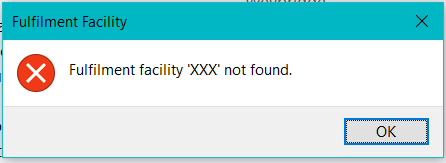
Fulfillment facility not found
Cause
The fulfillment facility entered could not be validated against the PorFulfilment table, or no cross-reference exists against the PorSupFulWh table.
Solution
Enter a fulfillment facility defined in the Fulfillment Facility Maintenance program, and confirm the warehouse and supplier cross-reference exists in the Warehouse Supplier Fulfillment Facility Maintenance program.
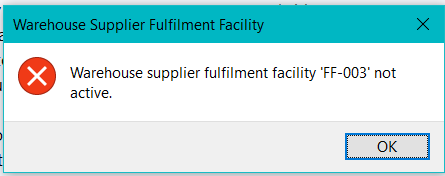 Active purchase orders exist for this facility
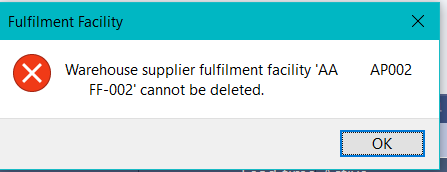
Cause
A deletion was requested for an active fulfillment facility that has active purchase orders associated with the warehouse/supplier and facility.
Solution
When deleting a single item, an error is returned and the cross-reference is retained. When deleting multiple items, that individual cross-reference is ignored and processing continues. The re-populated listview shows which items were ignored.
FAQs
What happens if no default Ship From address is configured?
The Ship From field is left blank and the user selects a valid facility. If the supplier has no facility defined, the supplier's address is used for dispatching, as before.
Can I use a different Ship From address on a single line?
Yes. The line defaults from the header, but you can override it. Where a line has a different receiving warehouse, the facility defaults from that warehouse.
Which facility is used when several apply to the same supplier and warehouse?
The active cross-reference with the lowest lead time is selected as the default.
Will my existing purchase orders still be valid?
Yes. Existing purchase orders remain valid with no Ship From address.
Using
Process
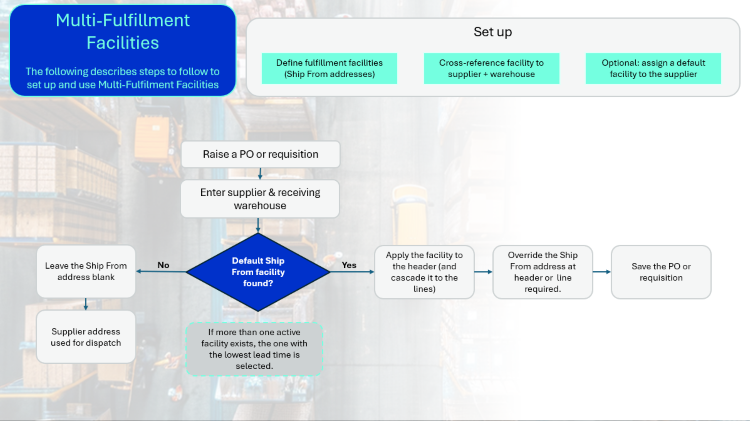
Set up
-
Define each fulfillment facility in the Fulfillment Facility Maintenance program (Program List > Purchase Orders > Multi Fulfilment Facility > Setup )
The Fulfillment Facility Maintenance process is as follows:
- To create a new Fulfillment facility:
- At the Fulfillment facility field in the toolbar, enter a code to identify the facility.
- At the Name field, enter a name (or the same code) for the facility.
- In the Fulfillment facility address pane, enter the Building, Street, City, Locality, State, Country and Zip. Optionally, captured Geolocation.
- In the Fulfillment facility details pane, enter the Geographic area, Contact name, Telephone number, Supplier email address, Shipping instructions.
- Select Save.
-
Cross-reference each facility to a supplier and warehouse in the Warehouse Supplier Fulfillment Facility Maintenance program (Program List > Purchase Orders > Multi Fulfilment Facility > Setup )
Multiple cross-references can be created per supplier/warehouse combination.
The Warehouse Supplier Fulfillment Facility Maintenance process is as follows:
-
At the Warehouse and Supplier fields in the toolbar, enter a valid warehouse and supplier.
Th e Warehouse Details and Supplier Details panes are populated, and the listview displays all fulfillment facilities defined for the warehosue and supplier combination.
-
To add a cross-reference:
-
At the Fulfillment Facility field, enter or browse for a facility. The facility is validated against the PorFulfilment table.
Facilities must first be defined in Fulfillment Facility Maintenance (Program List > Purchase Orders > Multi Fulfilment Facility > Setup ) to be available for selection.
-
-
At the Lead Time field, enter the lead time for the facility.
The lead time has no defined unit. Choose a unit (for example, days) and apply it consistently across all fulfillment facilities, as the lowest lead time is used to select the default facility. -
The Active check box is deselected by default. Select it to activate the cross-reference.
-
Select Save.
-
The new cross-reference is displayed in the listview.
-
Optionally, assign a default fulfillment facility to the supplier in the Suppliers program (Program List > Purchase Orders > Setup)
Purchase order and requisition process
-
Raise a purchase order (Purchase Order Entry) or requisition (Requisition Entry) and enter the supplier.
-
Enter the receiving warehouse.
-
The system determines the default Ship From facility for the supplier and warehouse. It uses the supplier default where one is defined, otherwise it uses an active supplier and warehouse cross-reference, configured in Warehouse Supplier Fulfillment Facility Maintenance (Program List > Purchase Orders > Multi Fulfilment Facility > Setup ).
-
Where more than one active cross-reference exists, it selects the one with the lowest lead time.
-
If no facility is found, the Ship From address is left blank and the supplier address is used for dispatch, as before.
-
The default is applied to the header and cascades to the lines. Where a line has a different receiving warehouse, the facility defaults from that warehouse.
-
The facility is validated against the PorFulfilment and PorSupFulWh tables and checked for active status.
If the facility is invalid or inactive an error is displayed and you must re-enter a valid facility. -
Accept the default, or override the Ship From address as header or line level.
-
Save the order.
-
Print or export the purchase order, including the selected Ship From address.
Affected programs
The following indicates areas in the product that may be affected by implementing this feature:
Setup programs
Fulfillment Facility Maintenance
Program List > Purchase Orders > Multi Fulfilment Facility > Setup
This program lets you add, change and delete the details pertaining to a fulfillment facility. A fulfillment facility lets you select the appropriate facility from a supplier, based on the destination warehouse for delivery, when a purchase order or requisition is raised. This helps reduce shipping costs, improve delivery times and lower greenhouse gas emissions.
Warehouse Supplier Fulfillment Facility Maintenance
Program List > Purchase Orders > Multi Fulfilment Facility > Setup
This program lets you capture fulfillment facilities in a cross-reference with both a supplier and a warehouse.
The cross-reference lets Syspro default the correct fulfillment facility when a purchase order or requisition is raised for a supplier and destination warehouse, applying lead time logic when more than one facility is active.
Suppliers
Program List > Purchase Orders > Setup
You use this program to capture and maintain details of suppliers required within the system.
Contract Maintenance
Program List > Purchase Orders > Blanket Purchase Orders > Setup > Contract Maintenance
You use this program to add new Blanket purchase Order contracts and to change the details for existing contracts.
Transaction Processing programs
Purchase Order Entry
Program List > Purchase Orders > Purchase Order Processing
This program lets you raise and maintain purchase orders against your suppliers.
The following indicates areas in the product that may be affected by implementing this feature:
-
The Fulfillment facility is added to the header and to the stocked and non-stocked line panes, defaulted from the supplier and warehouse, and saved to the PorMasterHdr and PorMasterDetail tables.
Requisition Create Purchase Orders
Program List > Purchase Orders > Requisition System > Transaction Processing
This program lets you create purchase orders from requisition lines.
The following indicates areas in the product that may be affected by implementing this feature:
-
Applies an active fulfillment facility to create purchase orders where none exists on the requisition, using lead time logic.
Purchase Order Review
You use this program to review and update live purchase orders and suggested purchase order requisitions that require corrective action to meet what has been planned within the snapshot files.
The following indicates areas in the product that may be affected by implementing this feature:
-
Applies an active fulfillment facility based on the supplier and warehouse before creating live requisitions or purchase orders, using lead time logic.
Requisition Review
Program List > Requirements Planning > Requirements Planning > Requisition Review
You use this program to review and update live and suggested purchase order requisitions that require corrective action to meet what has been planned within the snapshot files.
The following indicates areas in the product that may be affected by implementing this feature:
-
Applies an active fulfillment facility based on the supplier and warehouse before creating live requisitions or purchase orders, using lead time logic.
Purchase Order Header Information
This program lets you maintain purchase order information unrelated to the line details of the items being purchased.
The following indicates areas in the product that may be affected by implementing this feature:
-
The Fulfillment facility is added to the header pane and saved to the PorMasterHdr table.
PO Creation
This program lets you create a purchase order for both bought-out and non-stocked items for a specific sales order, or from the Multi-level Trial Kitting program.
The following indicates areas in the product that may be affected by implementing this feature:
-
The Fulfillment facility is added to the header and detail line panes and defaulted from the supplier and warehouse.
Requisition Entry
Program List > Purchase Orders > Requisition System > Transaction Processing
This program lets you view details of purchase order requisitions created by and/or originating from a specific requisition user.
The following indicates areas in the product that may be affected by implementing this feature:
-
The Fulfillment facility is added to the Detailed Information pane and saved to the ReqDetail table.
Quotation Purchasing Review
Program List > Quotations Processing > Quotation Conformation > Quotation Purchasing Review
You use this program to create purchase orders or requisitions to buy non-stocked items needed for a quotation.
The following indicates areas in the product that may be affected by implementing this feature:
-
Applies an active fulfillment facility when creating requisitions or purchase orders from a confirmed quotation.
Query programs
Supplier Query
Program List > Accounts Payable
This program lets you view data relating to your suppliers in the in the Accounts Payable module.
The following indicates areas in the product that may be affected by implementing this feature:
-
The Fulfillment facility is available from the field selector.
Purchase Order Query
Program List > Purchase Orders
This program lets you view details of purchase orders (including canceled and completed orders) that have not yet been purged.
The following indicates areas in the product that may be affected by implementing this feature:
-
The Fulfillment facility is available on the Detail Lines listview and on the Order Header pane via the Field Chooser.
Requisition Query
Program List > Purchase Orders > Requisition System > Requisition Query
You use this program to view detailed purchase order requisition information.
The following indicates areas in the product that may be affected by implementing this feature:
-
The Fulfillment facility is available on the Detail Lines listview via the Field Chooser.
Affected business objects
The following indicates the business objects that are affected by this feature:
Setup objects
AP Supplier Maintenance
The AP Supplier Maintenance business object lets you add, update or delete suppliers.
Fulfilment Facility Setup
The Fulfilment Facility Setup business object enables the use of fulfillment facilities from the supplier based on the destination warehouse.
Warehouse Supplier Fulfilment Facility
The Warehouse Supplier Fulfilment Facility business object enables the use of fulfillment facilities from the supplier based on the destination warehouse.
Transaction objects
PO Purchase Order Import
The PO Purchase Order Import business object is used to add a new purchase order and change or cancel an existing purchase order. Multiple orders can be passed to this object with any combination of the add, cancel and change requests. The input for each order is made up of header information and individual detail lines.
PO Requisition Entry
The PO Requisition Entry business object enables a new requisition to be captured or an existing requisition line to be changed.
Create P/orders from Requisitions
The Create P/orders from Requisitions business object will allow users to create purchase orders (or multiples thereof) from approved requisitions.
Query objects
AP Supplier Query
The AP Supplier Query business object lets you view supplier information.
Purchase Order Query
The Purchase Order Query business object lets you query purchase orders and returns purchase order header and detail line information.
PO Requisition Query
The PO Requisition Query business object returns a list of requisitions.
Copyright © 2026 Syspro PTY Ltd.