Program: Fulfillment Facility Maintenance

This program lets you add, change and delete the details pertaining to a fulfillment facility. A fulfillment facility lets you select the appropriate facility from a supplier, based on the destination warehouse for delivery, when a purchase order or requisition is raised. This helps reduce shipping costs, improve delivery times and lower greenhouse gas emissions.
Exploring
 Where it fits in?
This program forms part of the Multi Fulfillment Facilities capability, which lets organizations order items from suppliers that maintain multiple warehouses nationwide. You use it to define the facilities a supplier can dispatch from. A default fulfillment facility is always provided.
Things you can do in this program include:
-
Add a new fulfillment facility.
-
Change the details of an existing fulfillment facility.
-
Delete a fulfillment facility that is no longer required.
This program is accessed from the Program List of the Syspro menu:
Program List > Purchase Orders > Multi Fulfilment Facility > Setup
Terminology
Fulfillment facility (Ship From address)
A physical location from which a supplier dispatches goods, held as a Ship From address against the supplier. When applied to an order, it is used in place of the supplier's default address for dispatching.
Default fulfillment facility
The facility applied automatically when a purchase order or requisition is raised, before any manual selection is made. A default is always provided.
Lead time
The expected delivery time for a facility. When more than one active cross-reference exists, the facility with the lowest lead time is selected as the default.
Starting
Security
eSignatures
You can restrict access to the eSignature transactions within a program at operator, group, role or company level (configured using the Electronic Signature Configuration Setup program).
Electronic Signatures provide security access, transaction logging and event triggering that gives you greater control over your system changes.
To use this feature, the following eSignatures must be defined accordingly in the Electronic Signature Configuration Setup program (as this allows for the various functions in the related programs:
PO Fulfilment Facility Added
Controls access to the function that adds a fulfillment facility within this Fulfillment Facility Maintenance program.
PO Fulfilment Facility Changed
Controls access to the function that changes a fulfillment facility within the Fulfillment Facility Maintenance program.
PO Fulfilment Facility Deleted
Controls access to the function that deletes a fulfillment facility within the Fulfillment Facility Maintenance program.
PO Fulfilment facility added e.net
Controls access to the function that adds a fulfillment facility using the Fulfilment Facility Setup business object.
PO Fulfilment facility changed e.net
Controls access to the function that changes a fulfillment facility using the Fulfilment Facility Setup business object.
PO Fulfilment facility deleted e.net
Controls access to the function that deletes a fulfillment facility using the Fulfilment Facility Setup business object.
Solving
Error messages
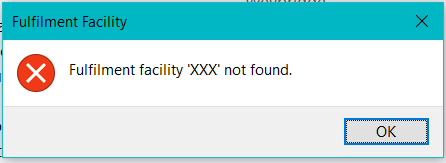
Fulfillment facility not found
Cause
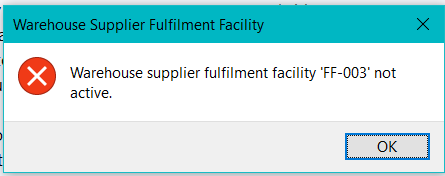
The fulfillment facility entered could not be validated against the PorFulfilment table, or no cross-reference exists against the PorSupFulWh table.
Solution
Enter a fulfillment facility defined in the Fulfillment Facility Maintenance program, and confirm the warehouse and supplier cross-reference exists in the Warehouse Supplier Fulfillment Facility Maintenance program.
 FAQs
What's the difference between the Fulfillment Facility Maintenance and Warehouse Supplier Fulfillment Facility Maintenance program?
FAQs
What's the difference between the Fulfillment Facility Maintenance and Warehouse Supplier Fulfillment Facility Maintenance program?
Fulfillment Facility Maintenance defines the facilities themselves, and Warehouse Supplier Fulfillment Facility Maintenance cross-reference each facility to a specific warehouse and supplier, with an active flag and lead time.
To define a facility use the Fulfillment Facility Maintenance program.
The Fulfillment Facility Maintenance process is as follows:
- To create a new Fulfillment facility:
- At the Fulfillment facility field in the toolbar, enter a code to identify the facility.
- At the Name field, enter a name (or the same code) for the facility.
- In the Fulfillment facility address pane, enter the Building, Street, City, Locality, State, Country and Zip. Optionally, captured Geolocation.
- In the Fulfillment facility details pane, enter the Geographic area, Contact name, Telephone number, Supplier email address, Shipping instructions.
- Select Save.
To cross-reference each facility use the Warehouse Supplier Fulfillment Facility Maintenance program.
The Warehouse Supplier Fulfillment Facility Maintenance process is as follows:
-
At the Warehouse and Supplier fields in the toolbar, enter a valid warehouse and supplier.
Th e Warehouse Details and Supplier Details panes are populated, and the listview displays all fulfillment facilities defined for the warehosue and supplier combination.
-
To add a cross-reference:
-
At the Fulfillment Facility field, enter or browse for a facility. The facility is validated against the PorFulfilment table.
Facilities must first be defined in Fulfillment Facility Maintenance (Program List > Purchase Orders > Multi Fulfilment Facility > Setup ) to be available for selection.
-
-
At the Lead Time field, enter the lead time for the facility.
The lead time has no defined unit. Choose a unit (for example, days) and apply it consistently across all fulfillment facilities, as the lowest lead time is used to select the default facility. -
The Active check box is deselected by default. Select it to activate the cross-reference.
-
Select Save.
-
The new cross-reference is displayed in the listview.
Why can I not delete a fulfillment facility?
A facility that is active and associated with open purchase orders through a warehouse/supplier cross-reference cannot be removed while those orders remain active.
When you remove a cross-reference in Warehouse Supplier Fulfillment Facility Maintenance, the following checks apply:
-
To remove a single cross-reference, select Delete on the listview line. To remove all facilities for a warehouse and supplier, enter a valid warehouse and supplier and select Delete on the toolbar.
-
Where a facility is active, the system checks for active purchase orders for that warehouse, supplier, and facility.
-
On a single deletion with active orders, an error is returned and the cross-reference is retained.
-
On a multiple deletion with active orders, the affected cross-reference is ignored and processing continues. The re-populated listview shows which items were ignored.
Using
Hints and Tips
-
Define your fulfillment facilities in this program first, then cross-reference them to warehouses and suppliers in the Warehouse Supplier Fulfillment Facility Maintenance program (Program List > Purchase Orders > Multi Fulfilment Facility > Setup )
-
Because validation runs only on a toolbar key, review your entries before saving.
-
Where a supplier has no fulfillment facility defined, the supplier's address is used for dispatching, as before.
Process
The Fulfillment Facility Maintenance process is as follows:
- To create a new Fulfillment facility:
- At the Fulfillment facility field in the toolbar, enter a code to identify the facility.
- At the Name field, enter a name (or the same code) for the facility.
- In the Fulfillment facility address pane, enter the Building, Street, City, Locality, State, Country and Zip. Optionally, captured Geolocation.
- In the Fulfillment facility details pane, enter the Geographic area, Contact name, Telephone number, Supplier email address, Shipping instructions.
- Select Save.
Referencing



This lets you indicate the code that uniquely identifies a new fulfillment facility or locate an existing fulfillment facility using the advanced browse.
Fulfillment facility details
This relates to the details captured against the facility. These details are saved to the PorFulfilment table by the Fulfilment Facility Setup business object.
| Field | Description |
|---|---|
|
Fulfilment facility address |
This lets you capture the dispatch address for the facility, used in place of the supplier's address when the facility is applied to an order. |
|
Fulfilment facility details |
This lets you capture the fulfillment facility's details. |
Copyright © 2026 Syspro PTY Ltd.