Topic: Freight Bracket Pricing

Freight Bracket Pricing gives Syspro customers a structured way to recover freight costs directly within sales pricing, without adding a separate charge line to the order. By automatically applying a markup based on an order's total mass or volume, calculated and applied at line level through freight bracket profiles and tiers, pricing reflects actual shipping requirements. Because rates are configured by customer, contract and stock code, businesses can tailor freight recovery to match the way they already price and ship, keeping it embedded within the standard sales order process.

Exploring
 Where it fits in?
Functionality
Where it fits in?
Functionality
Freight bracket pricing extends Sales Order contract Pricing . Once a contract pricing customer is set up to use a freight bracket profile, each stocked line on a standard sales order is checked against the profile's tiers, based on the order's total mass or volume, and a markup is calculated and added to the line value.
The markup is either a fixed amount per stocking unit of measure or a percentage of the gross line value before discounts, and it posts to a dedicated general ledger account defined on the profile. Because the markup is embedded in the line value, freight recovery stays inside the standard sales order pricing flow instead of requiring a separate charge line.
Freight bracket pricing applies to standard sales orders only. It is not applied to credit notes, service/counter sales transactions (SCTs), point of sale (counter sales) entry, quick sales order entry, or quotation entry and confirmation.
Benefits
-
Freight cost recovery
Freight costs are directly recovered in the selling price, without a separate charge line on the order.
-
Customer specific control
Rrates are configured by customer, contract and stock code, so freight recovery matches each trading agreement.
-
Automatic calculation
The freight markup is calculated automatically during sales order entry and import, removing manual work for operators.
-
Transparency
The freight bracket profile, tier, rate and value are visible on the order, so operators can see how a markup was applied.
-
Shipment-based qualification
Tiers are based on the total mass or volume of the order, so the markup reflects the size of the actual shipment.
The programs related to this feature are accessed from the Program List of the Syspro menu:
- Program List > Sales Orders > Contract Pricing
Terminology
Freight bracket pricing
The capability that marks up the selling price of stock items on a sales order to recover freight costs. Markup rates are set against Sales Order Contract Pricing for a customer, contract and stock code, and are applied based on the tier for which the order qualifies.
Freight bracket profile
A user-defined template that groups the rules for a freight recovery method, for example STD-MASS or PREM-VOL. A profile defines a tier qualifier, a rate type and the general ledger account that the freight uplift posts to.
A profile cannot be deactivated or deleted while it is linked to a customer.
Freight bracket tier
A band of mass or volume values, for example small, medium or large, configured against a freight bracket profile. The tier that a sales order qualifies for, based on its total mass or volume, determines which rate applies. Tiers on the same profile cannot overlap.
The tier qualifier defines whether a freight bracket profile's tiers are based on the mass or the volume of a sales order.
The rate type defines how the freight markup is calculated for a freight bracket profile: a fixed amount charged per stocking unit of measure, or a percentage of the gross line value calculated before discounts are applied.
Starting
Prerequisites
No company-level setup options need to be configured to use this feature. Freight bracket profiles and tiers are configured directly in the Freight Bracket Maintenance program.
To use this feature, the following module(s) must be installed according to the terms of your software license agreement:
-
Sales Orders
Security
You can secure this feature by implementing a range of controls against the affected programs. Although not all these controls are applicable to each feature, they include the following:
- You restrict operator access to activities within a program using the Operator Maintenance program.
- You can restrict operator access to the fields within a program (configured using the Operator Maintenance program).
- You can restrict operator access to functions within a program using passwords (configured using the Password Definition program). When defined, the password must be entered before you can access the function.
- You can restrict access to the eSignature transactions within a program at operator, group, role or company level (configured using the Electronic Signature Configuration Setup program). Electronic Signatures provide security access, transaction logging and event triggering that gives you greater control over your system changes.
- You can restrict operator access to programs by assigning them to groups and applying access control against the group (configured using the Operator Groups program).
- You can restrict operator access to programs by assigning them to roles and applying access control against the role (configured using the Role Management program).
Restrictions and Limits
-
Freight bracket pricing can only be applied to customers that are set up as contract pricing customers.
You use the SO Contract Pricing Maintenance program to maintain contracts for specific customers or buying groups.
Solving
FAQs
When is the freight bracket value calculated?
It is calculated automatically when a stocked line is added on a standard sales order, using the Sales Order Entry program, Sales Order Entry Express program or the SO Sales Order Import business object, provided the customer is set up to use freight bracket pricing.
What determines which freight bracket tier a line qualifies for?
This is determined by the sales order line's mass or volume. Syspro calculates this from the stock item's mass or volume and the order quantity, converted to the stocking unit of measure, and then matches it to a tier on the customer's freight bracket profile.
Where does the rate come from?
The rate is retrieved from the freight bracket contract prices, based on the matching tier, the customer, the stock code and the contract.
How is the freight bracket value calculated?
This depends on the rate type.
For a percentage rate, the line value is multiplied by the rate and divided by 100.
For a fixed rate, the rate is multiplied by the order quantity in the stocking unit of measure.
Using
Process
Setup and Configuration
-
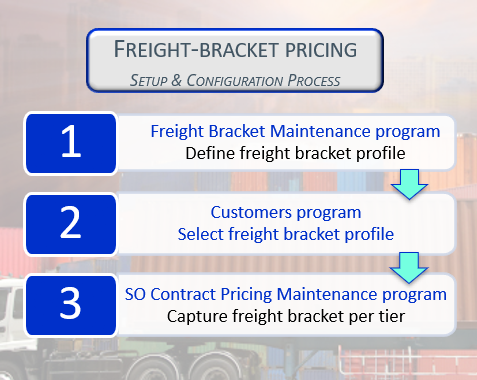
Define a freight bracket profile and tiers in the Freight Bracket Maintenance program.
To create a new freight bracket pricing profile:
-
Capture the freight bracket profile code and description.
-
Select the ledger code to which the freight will be posted.
-
Select the tier qualifier (mass or volume) and rate type.
-
Add the freight bracket tiers for the profile. Give each tier a meaningful name and a From and To range, in the unit of measure set by the Tier qualifier.
-
Save the profile.
-
-
In the Customers program, select Apply Freight Bracket Pricing and choose the customer's freight bracket profile.
Saving the profile against the contract pricing customer activates the freight bracket profile.
-
In the SO Contract Pricing Maintenance program, capture a freight bracket rate for each tier that applies to the customer, stock code and contract.
To select a freight bracket tier:
-
Launch the In the SO Contract Pricing Maintenance program and navigate to the Freight bracket rates pane.
-
Select the Search button on the FBP Tier field to browse the list of tiers configured for the freight bracket profile and select the required tier.
Freight bracket tiers are saved to the SorFbpTiers table. Rates are saved in the SorFbpContract table and applied to contract prices.
-
Affected programs
The following indicates areas in the product that may be affected by implementing this feature:
Setup programs
Freight Bracket Maintenance
Program List > Sales Orders > Contract Pricing > Setup
This program lets you create and maintain freight bracket profiles and the tiers configured against them.
Customers
Program List > Contact Management > Setup
You use this program to capture and maintain details of customers required within the system. The information captured is also used in the Customer Query program.
For the Freight Bracket Pricing enhancement, we added the following:
-
Freight bracket pricing section on the General Details pane.
The freight bracket profile will be updated to Active in the SorFbpMaster table when it is saved against the customer.
If you disable the Contract pricing setup option against the customer, then the freight bracket fields are disabled and cleared.
SO Contract Pricing Maintenance
Accessible from the Change option in the SO Contract Prices program.
This program lets you maintain contracts for specific customers and/or buying groups.
For the Freight Bracket Pricing enhancement, we added the following:
-
Freight bracket pricing section on the General Details pane.
Transaction Processing programs
Sales Order Entry
Program List > Sales Orders > Sales Order Processing
This program lets you record and maintain various types of sales orders.
For the Freight Bracket Pricing enhancement, we added the following:
-
Freight bracket pricing section on the Order Header pane.
-
Freight bracket pricing section in the Stocked Line pane.
Sales Order Entry Express
Program List > Sales Orders > Sales Order Processing
This program lets you capture sales orders using a grid-style entry process.
For the Freight Bracket Pricing enhancement, we added the following:
-
Freight bracket pricing section on the Order Header.
-
Freight bracket value field in the Sales order lines capture pane.
Query programs
Customer Query
Program List > Accounts Receivable
This program lets you view data relating to your customers in the Accounts Receivable module.
For the Freight Bracket Pricing enhancement, we added the following:
-
Freight bracket pricing section on the Customer Information pane.
Browse programs
Freight Bracket Tiers
Accessible from the FBP Tier field on the Freight bracket rates pane within the SO Contract Pricing Maintenance program.
This program lets you view all tiers set up against a freight bracket profile.
Affected business objects
The following indicates the business objects that are affected by this feature:
Setup objects
SO Freight Bracket Profile Maintenance
The SO Freight Bracket Profile Maintenance business object allows you to capture freight bracket profiles.
SO Freight Bracket Tier Maintenance
The SO Freight Bracket Tier Maintenance business object allows you to capture the tiers configured against a freight bracket profile.
AR Customer Maintenance
The AR Customer Maintenance business object lets you add, update or delete customers.
Transaction objects
SO Contract Pricing Maintenance
The SO Contract Pricing Maintenance business object is used to maintain contract pricing for sales orders.
SO Sales Order Import
The SO Sales Order Import business object lets you add a new sales order and change or cancel an existing sales order.
Multiple orders can be passed to this object with any combination of the add, cancel and change requests. The input for each order is made up of header information and individual detail lines.
Query objects
Customer Query
The Customer Query business object lets you view information held against a customer in the Accounts Receivable module.
SO Sales Order Valuation Query
The SO Sales Order Valuation Query business object lets you return the total value of an existing or potential sales order.
Component objects
SO Build Sales Order Line
The SO Build Sales Order Line business object lets you create a sales order line for a stocked item using the SO Sales Order Import business object. This business object returns sufficient data in order to populate the StockLine section of SO Sales Order Import.
Copyright © 2026 Syspro PTY Ltd.