Topic: WIP Subcontract Operations Management

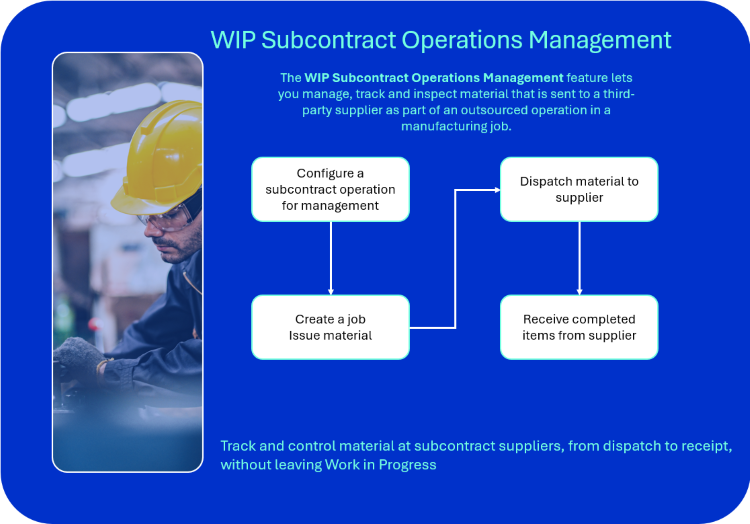
The WIP Subcontract Operations Management feature lets you manage, track and inspect material that is sent to a third-party supplier as part of an outsourced operation in a manufacturing job. It records dispatch and receipt transactions against the job operation, maintains lot and serial traceability through the off-site cycle, and supports quality inspection on return without changing the work in progress value of the job.
 PDF version
Exploring
 Where it fits in?
We use this feature to control and account for material that leaves your premises for an outsourced operation, and to record the work that returns from the supplier against the job operation.
You can use this feature to:
-
Issue job-allocated material to a subcontract supplier in a controlled manner.
-
Track each dispatch by stock code, warehouse, allocation line, lot and serial.
-
Capture and monitor expected receipt dates per subcontract operations.
-
Receive completed work back against the job operation.
-
Inspect returned items using the Quality Management Inspection Engine before continuing in production.
-
Return unused material from the supplier back to stock.
Benefits
-
Full visibility of material at suppliers, by job or by supplier.
-
End-to-end lot and serial traceability through the off-site cycle.
-
Reduced manual reconciliation of subcontracted work.
-
Inspection on return ensures only quality-approved material re-enters production.
-
Expected receipt dates support more accurate production scheduling.
Functionality
-
Material issued to a job for a subcontract operation is recorded as dispatched, tracked while off-site, and received back against the operation when the work is complete.
-
Lot and serial selections are preserved through dispatch, return and receipt, allowing reconciliation of what was sent against what came back.
-
The dispatch mode is configured per operation:
-
Controlled dispatch: Each dispatch event is recorded explicitly through the WIP Subcontract Operation Management program, supporting multiple shipments and partial quantities.
-
Automatic dispatch: The material is flagged as dispatched at the point of job issue.
-
-
Expected receipt dates are maintained against the operation for scheduling visibility.
-
Inspection on receipt uses the Quality Management Inspection Engine, with tests linked to the supplier and the subcontract stock code defined against the operation.
Inspection is only performed when In-Process Inspection is configured for the subcontract operation. When it is not configured, the inspection step is skipped. -
Dispatch does not move stock and does not create a financial transaction. The value of the issued material remains in Work In Progress until the operation is completed and labor is posted.
This program is accessed from the SYSPRO program menu:
- WIP Subcontract Operation Management - Program List > Work in Progress > WIP Job Nesting
Terminology
Subcontract operations
An operation in a Bill of Materials (BOM) that is performed by an external supplier rather than at an internal work center. Subcontract operations are added to the Bill of Materials (BOM) using the Structures and Routings (Program List > Bill of Materials > Setup) program and are identified by setting the Manage operation option to Yes.
Subcontract stock code
The subcontract stock code is a free-form, non-stocked code entered against the operation to identify the service performed by the supplier. This field is used on Purchase Orders raised for subcontract work.
The subcontract code is mandatory when operation management is enabled and must be unique within the Bill of Materials (BOM).
Dispatch
In the context of WIP Subcontract Operations Management, a dispatch is the act of recording that job-issued material has been sent to a subcontract supplier for an outsourced operation. It is unrelated to the dispatch of sales orders from a warehouse.
A dispatch does not move stock and does not create a financial transaction. It records quantity, lot and serial information against the operation for traceability and reconciliation.
The dispatch mode is set per operation:
-
Controlled dispatch. Each dispatch event is recorded explicitly through the WIP Subcontract Operation Management program (Program List > Work in Progress > Job Postings )
-
Auto dispatch. Material is flagged as dispatched at the moment it is issued to the job through the Job Issues program. No further action is required from the dispatcher and the Dispatch function in the WIP Subcontract Operation Management program is disabled.
Receive
The act of recording completed or processed items received from the subcontractor against the job operation. The received quantity is used as the default for pieces completed when posting labor against the operation.
Return
The act of recording stock that was dispatched to the subcontractor but not used, returning the material to inventory stock.
Starting
Prerequisites
-
The Manage operation flag must be enabled under Maintain Operations within the Structures and Routings program.
-
At least one subcontract operation must be defined against the parent part in the Structures and Routings program.
-
At least one component must be linked to a subcontract operation.
-
To use the inspection on receipt, ensure the Subcontract inspection level option is enabled in the Inspection Level Review program under Inspection Level Review
-
An inspection test must be linked to the inspection level, with the source defined as the supplier and the stock code defined as the subcontract stock code from the operation.
Electronic Signatures
To use this feature, the following eSignatures must be defined accordingly in the Electronic Signature Configuration Setup program (as this allows for the various functions in the related programs):
-
WIP Subcontract dispatch
-
WIP Subcontract receive
Security
You can secure this feature by implementing a range of controls against the affected programs. Although not all these controls are applicable to each feature, they include the following:
- You restrict operator access to activities within a program using the Operator Maintenance program.
- You can restrict operator access to the fields within a program (configured using the Operator Maintenance program).
- You can restrict operator access to functions within a program using passwords (configured using the Password Definition program). When defined, the password must be entered before you can access the function.
- You can restrict access to the eSignature transactions within a program at operator, group, role or company level (configured using the Electronic Signature Configuration Setup program). Electronic Signatures provide security access, transaction logging and event triggering that gives you greater control over your system changes.
- You can restrict operator access to programs by assigning them to groups and applying access control against the group (configured using the Operator Groups program).
- You can restrict operator access to programs by assigning them to roles and applying access control against the role (configured using the Role Management program).
Restrictions and Limits
-
Over-receipting is not allowed. The cumulative received quantity for an operation cannot exceed the quantity at the supplier.
-
Over-dispatching is not allowed. The cumulative dispatched quantity cannot exceed the quantity issued to the job for the operation.
-
Labor cannot be posted to a managed subcontract operation until the receipt for the operation is marked as complete.
-
Subcontract operation management does not create or require a Purchase Order. A managed subcontract operation must not have a Purchase Order linked to it through the legacy subcontract mechanism, as the two paths cannot be used together on the same operation. To use WIP Subcontract Operations Management for the operation, do not link a Purchase Order to it. If your procurement process raises a Purchase Order for the supplier's invoice, configure the order independently of the operation through the Purchase Order Entry program. The WIP Subcontract Management Query program provides the dispatch and receipt history that procurement can use to reconcile against the supplier's invoice.
-
Dispatch does not move stock and does not create a financial transaction. The value of the issued material remains in Work In Progress until receipt and labor posting are complete.
Solving
FAQs
How do I enable Subcontract Operation Management on a Bill of Materials (BOM)?
-
Access the Structures and Routings program.
-
Select the parent part and add or change the subcontract operation.
-
Within Operation Management , enable the Manage operation option.
-
Enter a unique Subcontract stock code for the operation.
This is the same field that was previously labelled P/order stock code. -
Set the Auto dispatch option to Yes or No, depending on whether you want material to be flagged as dispatched at the point of Job Issue.
-
Save your changes.
Can I configure managed subcontract operations in Estimates or Product Configurator?
Not directly. The Manage operation and Auto dispatch options are not currently available on the Subcontract Operation Details pane in the Estimates program or the Subcontract Details pane within Product Configurator Maintenance program.
To configure subcontract operation management for an operation that originates from an estimate or product configuration:
-
Create and confirm the job through the Job Entry program.
-
Access the operation using the WIP Job and Op Maintenance program (selected from the Change function in the WIP Browse on Labor Allocations program).
-
Enable the Manage operation option on the operation.
-
Enter the Subcontract stock code and set the Auto dispatch option as required.
-
Save the operation
The operation is then included in the WIP Subcontract Operation Management program for dispatch, receipt and return processing.
Where can I see items received from the subcontractor?
Items received from the subcontractor are visible in two places, depending on the level of detail you need.
WIP Subcontract Operation Management program
Program List > Work in Progress > Job Postings
The cumulative received quantity is displayed in the Quantity column on the listview, alongside the operation's dispatch and due date information. If the column is not visible, use the Field Chooser (right-click on a column header) to add it.
Each Receive action updates the cumulative received quantities against the operation within WIP Subcontract Management Query. There is therefore no list of individual receipt events.
WIP Subcontract Management Query program
Program List > Work in Progress
Received items are visible against the operation in the Received quantity column of the Subcontract Operations listview.
-
Select the Include complete selection criteria option.
-
Review the completed quantity within the Received quantity column.
What is the difference between controlled and automatic dispatch?
In the context of WIP Subcontract Operations Management, a dispatch is the act of recording that job-issued material has been sent to a subcontract supplier for an outsourced operation. It is unrelated to the dispatch of sales orders from a warehouse.
A dispatch does not move stock and does not create a financial transaction. It records quantity, lot and serial information against the operation for traceability and reconciliation.
The dispatch mode is set per operation:
-
Controlled dispatch. Each dispatch event is recorded explicitly through the WIP Subcontract Operation Management program (Program List > Work in Progress > Job Postings )
-
Auto dispatch. Material is flagged as dispatched at the moment it is issued to the job through the Job Issues program. No further action is required from the dispatcher and the Dispatch function in the WIP Subcontract Operation Management program is disabled.
How is the due date calculated?
The due date is the date on which the completed work is expected back from the subcontractor. It supports production planning and is used to highlight operations that are overdue.
It is calculated from the date the material is dispatched, plus the off-site time defined against the subcontract operation. You can override the calculated due date manually from the WIP Subcontract Operation Management program. Overdue operations (where the system date is later than the due date and the received quantity is less than the planned pieces) are highlighted on the listview
How do I return unused material from the subcontractor?
-
Access the WIP Subcontract Operation Management program (Program List > Work in Progress > Job Postings )
-
Select the relevant subcontract operation line.
-
Select the Return function from the listview.
-
Enter the quantity being returned at the relevant material line, including lot or serial selection where applicable.
-
Save the return.
Can I post labor to a subcontract operation before it has been received?
No. When Subcontract Operation Management is enabled for the operation, the Labor Posting program prevents labor from being posted until the receipt is marked as completed.
The received quantity captured in the WIP Subcontract Operation Management program is loaded as the default for pieces completed.
What happens to the inspection when items are received?
If a WIP subcontract inspection level is configured for the subcontract stock code and supplier, the Inspection Level Review program can be opened when you receive items in the WIP Subcontract Operation Management program. The inspection tests are then completed through the Inspection Test Queue program. The operation can only be marked as complete after the inspection tests are submitted.
Is a Purchase Order required for the subcontract service?
No. Subcontract operation management does not create or require a Purchase Order. If your procurement process raises a Purchase Order for the supplier's invoice, this continues through the Purchase Order Entry program independently.
The WIP Subcontract Management Query program provides the dispatch and receipt history that procurement can use for reconciliation.
Can I link a Purchase Order to a managed subcontract operation?
No. The legacy Purchase Order-linked subcontract path and the WIP Subcontract Operation Management program are alternative ways of processing the same operation and should not be used together against the same operation.
If both are configured against the same operation:
-
A Purchase Order receipt marks the operation as complete and posts the cost to the job through the legacy path.
-
Once the operation is marked complete, the Receive function in WIP Subcontract Operation Management cannot be used against the operation.
-
Marketing the operation as incomplete through the labor transaction does not restore the ability to receive through WIP Subcontract Operation Management.
To use WIP Subcontract Operations Management for the operation, do not link a Purchase Order to it. If your procurement process raises a Purchase Order for teh supplier's invoice, configure the order independently of the operation through the Purchase Order Entry program. The WIP Subcontract Management Query program provides the dispatch and receipt history that procurement can use to reconcile against the supplier's invoice.
How do I use this feature to track samples sent off site for quality testing?
You can use WIP Subcontract Operations Management together with Quality Management - In Process Inspection to track raw material samples sent to a third-party laboratory for specialized testing. The testing service is set up as a subcontract operation, with the sample as a component material linked to the operation. On receipt, the Quality Management - In Process Inspection Engine generates the tests that capture the results returned by the laboratory.
To set up the test workflow:
-
Access the Structures and Routings program and add a subcontract operation against teh parent stock code, representing the testing service.
-
Enable the Manage operation flag under Maintain Operations.
-
Enter a unique Subcontract stock code that identifies the testing service.
-
Set the supplier to the testing laboratory.
-
Define the off-site time as the expected testing turnaround.
-
Link the sample material as a component to the subcontract operation.
-
Access the Inspection Level Review program and configure a WIP subcontract inspection level for the supplier (i.e. testing laboratory) and the Subcontract stock code, with the test design representing the quality tests to be performed.
To process samples sent for testing:
-
Create the job through the Job Entry program.
-
Issue the sample material to the job through the Job Issues program or via the Issue function in the WIP Subcontract Operation Management program.
-
Dispatch the same to the testing laboratory through the Dispatch function. Print the dispatch note using the Subcontract Dispatch report to accompany the sample.
-
When the test results are received from the laboratory, use the Receive function to record the receipt against the operation. This triggers the creation of the inspection tests in the Quality Management - In Process Inspection Engine.
-
Capture the test results returned by the laboratory through the WIP Subcontract Management Query program.
-
Mark the operation as complete.
How do I handle purchase components that are drop-shipped to the subcontract supplier?
This scenario is supported. The WIP Subcontract Operations Management workflow remains the same whether the component material is shipped by your warehouse or drop-shipped to the subcontract supplier by a third-party supplier. The drop-ship variation differs from the standard WIP Subcontract Operations Management process (i.e., configure, create job, issue, dispatch, receive, inspect, complete, post labor) in how the material is procured and received. Only the physical movement of the material changes; the way it is tracked in Syspro is unchanged.
The recommended process for drop-shipped components is:
-
The Requirements Planning module plans the component requirement against the subcontract operation in the same way as for any other operation. The demand is generated from the job's component allocations and processed by the Requirements Calculation program during its next run.
-
Convert the suggested order into a Purchase Order through the Purchase Order Entry program. On the Purchase Order Header, set the Select delivery address to an alternate delivery address representing the subcontract supplier.
Alternate delivery addresses are maintained using the PO Multiple Delivery Address Maintenance program (Program List > Purchase Orders > Setup) - The component supplier ships the material directly to the subcontract supplier.
- When the subcontract supplier confirms delivery, capture the Purchase Order receipt through the Purchase Order Receipts program. This records the material in Syspro and makes it available to the job.
From this point, the standard WIP Subcontract Operations Management process applies: Issue the material to the job, dispatch (auto or controlled), receive the complete work, inspect (if applicable), mark the operation as complete and post labor.
Because the material is already physically at the subcontract supplier when the Purchase Order is received, enabling Auto dispatch on the operation matches the physical reality of the workflow. The dispatch is recorded at the moment the material is issued to the job, removing the need for a separate dispatch step.
Using
Process
-
Configure the subcontract operation on the Bill of Materials (BOM) using the Structures and Routings program, with Manage operation enabled and the Subcontract stock code defined.
-
Configure inspection requirements (optional) in the Inspection Level Review program with the WIP subcontract option.
-
Create and confirm the job through the Job Issues program.
-
Issue component material to the job using the Job Issues program, either directly or through the issue function of the WIP Subcontract Operation Management program (Program List > Work in Progress > Job Postings ) (this can be skipped when auto dispatch is enabled)
-
Print the dispatch note using the Subcontract Dispatch program (Program List > Work in Progress > Reports ).
-
Capture or update the expected receipt date for scheduling visibility.
-
Receive the completed items using the Receive function of the WIP Subcontract Operation Management program.
-
Complete the inspection through the Inspection Test Queue program (Program List > Quality Management > Inspection > Transaction Processing). (if applicable)
-
Mark the operation as complete.
-
Post labor for the operation using the Labor Posting program (Program List > Work in Progress > Job Postings).
Configuring a subcontract operation for management
You configure a subcontract operation for management in the Structures and Routings program (Program List > Bill of Materials > Setup). This sets the flag that includes the operation in subcontract operation management, defines the dispatch mode, and link the component materials that will be sent to the supplier.
-
Open the Structures and Routings program and select the parent part.
-
Add or change the subcontract operation.
-
At the operation form, enable Manage operation. Only operations where this flag is set to Yes are included in subcontract operation management.
-
Enter a unique Subcontract stock code.
The Subcontract stock code is a free form entry field associated with the operation. It is used as the non-stocked code when a Purchase Order is created for subcontract work.
Prior to Syspro 8 2026 R1 the field was called P/order stock code. -
Set Auto dispatch:
-
Set to Yes to issue material to the supplier automatically when it is issued to the job. No further dispatch step is required.
-
Set to No to require an explicit dispatch event through the WIP Subcontract Operation Managementprogram (Program List > Work in Progress > Job Postings ) for each shipment.
-
-
Verify that the supplier and off-site time are defined against the operation.
-
Link the component materials that will be sent to the supplier to this operation. For each component on the Bill of Materials (BOM) that will be dispatched to the supplier as part of this operation, set the Operation to the subcontract operation number. Only materials linked to the operation in this way are visible to the dispatch and issue functions of the WIP Subcontract Operation Management program.
-
Save the operation.
Create a job and Issue Material
Before material can be dispatched, the component material linked to the subcontract operation must be issued to the job first.
Dispatch material to supplier
-
Open the WIP Subcontract Operation Management program.
-
Filter the listview by Supplier, Job or Subcontract stock code.
-
Select the subcontract operation line.
-
Select the Issue hyperlink to issue stock and the quantity being dispatched to the subcontractor.
The Issue function on the WIP Subcontract Operation Management listview provides a scoped route into Job Issues for this purpose. -
Select the Dispatch hyperlink. The dispatch screen displays the material issued to the job for the operation, with a line for each stock code, warehouse, allocation line, lot and serial.
-
Enter the dispatch quantity at the relevant material lines. The dispatch quantity may not exceed the quantity available for dispatch.
-
Save the dispatch.
Return unused material
Where material was dispatched to the supplier but not used in the outsourced operation, use the Return function to reinstate the material against the job allocation. A return reverses the dispatch and is processed as a negative issue against the job, restoring the lot and serial information back to inventory stock.
-
Open the WIP Subcontract Operation Management program.
-
Select the subcontract operation line.
-
Select the Return hyperlink. The return screen displays the material currently at the supplier, with a line for each stock code, warehouse, allocation line, lot and serial.
-
Enter the return quantity at the relevant material lines. The return quantity may not exceed the quantity at the supplier.
-
Save the return.
Updating the expected receipt date
-
Open the WIP Subcontract Operation Management program.
-
Select the subcontract operation line.
-
Edit the Due date column directly in the listview.
-
Save the change.
Receiving completed items from a supplier
-
Open the WIP Subcontract Operation Management program.
- Select the subcontract operation line.
- Select the Receive hyperlink.
- Enter the quantity received from the supplier. The cumulative received quantity cannot exceed the quantity at the supplier.
- Save the receipt.
- If WIP subcontract inspection is configured for the operation, the inspection tests are created at this point.
- Complete the inspection tests through the Inspection Test Queue program.
- Return to the WIP Subcontract Operation Management program and mark the operation as complete.
Affected programs
The following indicates areas in the product that may be affected by implementing this feature:
Setup programs
Structures and Routings
Program List > Bill of Materials > Setup
This program lets you define your bills of materials (i.e. the elements required in a sequence of manufacturing operations, as well as the structural relationships between parent and component parts).The following indicates areas in the product that may be affected by implementing this feature:
The Manage operation and Auto Dispatch options are displayed on the subcontract operation form.
The P/order stock code field is captioned as Subcontract stock code when Manage operation is enabled. The field is mandatory and must be unique within the Bill of Materials (BOM).
The Subcontract stock code is a free form entry field associated with the operation. It is used as the non-stocked code when a Purchase Order is created for subcontract work.
Acceptance Quality Limit
Program List > Quality Management > Setup
This program lets you establish the acceptance quality limits for critical, major and minor defects for each inspection level.
The AQL levels are defined to determine the number of items within the sample quantity that can fail the inspection test, before the entire batch is rejected.
Specifying the AQL levels is only necessary if the Sample basis field of the inspection level is defined as Sample quantity within the Inspection Level Review program.
The following indicates areas in the product that may be affected by implementing this feature:
A Subcontract option is displayed at the inspection level form.
The Process column on the inspection levels listview reflects WIP subcontract tests.
When adding a WIP subcontract inspection level, the supplier is taken form the subcontract operation and the stock code is the subcontract stock code from the operation.
Transaction Processing programs
Job Issues
Program List > Work in Progress > Job Postings
This program lets you issue all component parts and labor allocations to a confirmed job.The following indicates areas in the product that may be affected by implementing this feature:
When called from the WIP Subcontract Operation Management program, the kit issue screen is loaded, scoped to the material linked to the selected job operation. Main toolbar options for selecting a different job, transaction type or operation are disabled.
When auto dispatch is enabled for the operation, issuing material to the job also writes the issued quantity, lot and serial to the WipSubManage table and flags the material as dispatched.
WIP Job and Op Maintenance
This program can be accessed by selecting the Change option from the WIP Browse on Labor Allocations program.
You use this program to maintain existing operation allocations for a job.
The following indicates areas in the product that may be affected by implementing this feature:
-
The Manage operation and Auto dispatch options are displayed for subcontract operations.
WIP Add an Operation
This program can be accessed by selecting the Add option from the WIP Browse on Labor Allocations listview.
You use this program to add operation allocations to a job.
The following indicates areas in the product that may be affected by implementing this feature:
-
The Manage operation and Auto dispatch options are displayed when adding a subcontract operation to a live job.
Labor Posting
Program List > Work in Progress > Job Postings
This program lets you post time against a specific job.
The following indicates areas in the product that may be affected by implementing this feature:
-
Labor cannot be posted against a managed subcontract operation until the receipt has been marked as complete.
-
The quantity received from the supplier is loaded as the default value at the Pieces completed field.
Batch programs
WIP Subcontract Operation Management
Program List > Work in Progress > Job Postings
This program lets you manage the full life cycle of a subcontract operation, from dispatching job-issued material to a supplier through to receiving completed work back, returning unused material, capturing the expected receipt date and marking the operation as complete.
Inspection Level Review
Program List > Quality Management > Non Conformance Reporting > Setup
This programs lets the quality supervisor or manager assign the tests that will be executed per hierarchy level according to inspection type, warehouse, stock code or supply chain (customer or supplier) and to define the sample basis used for tests.
The following indicates areas in the product that may be affected by implementing this feature:
-
A WIP subcontract option is displayed at the inspection level form.
-
The Process column on the inspection levels listview reflects WIP subcontract tests.
-
When adding a WIP subcontract inspection level, the supplier is taken from the subcontract operation and the stock code from the subcontract stock code from the operation.
Inspection Test Queue
Program List > Quality Management > Inspection > Transaction Processing
This program displays all sample tests that were created using the Inspection Test Design program and allows inspectors to update the tests assigned to them.
The following indicates areas in the product that may be affected by implementing this feature:
-
A WIP subcontract inspections option is displayed at the inspection options pane.
-
A Supplier filter is provided in the selection criteria.
-
A new inspection type, S -Subcontract inspect, is supported.
Report programs
Subcontract Dispatch
Program List > Work in Progress > Reports
This program lets you generate a report to print the dispatch note for material sent to a subcontract supplier as part of an outsourced operation. Each material line is listed with its lot, serial and dispatched quantity, grouped by supplier, then by job and operation.
Query programs
WIP Subcontract Management Query
This program lets you query all information related to managed subcontract operations, including the material linked to each operation, dispatched quantities with lots and serials, returned quantities, received quantities, inspection status and operation completion status.
Affected business objects
The following indicates the business objects that are affected by this feature:
Setup objects
BOM Routing Maintenance
The BOM Routing Maintenance business object is used to maintain both internal and subcontract operations against an existing parent stock code, revision, release and route. The method used dictates which maintenance function is being performed on operations.
Additional information
Operations are used in SYSPRO to document the work that is required to manufacture a parent part. The details held against an operation include the sequence, the work center (which may refer to a subcontract supplier), tooling required, time required, number of operators required and number of productive units required.
Specific narrations cannot be added or changed using this business object. To do this, use the BOM Specific Narrations business object.
Inspection Level Setup
The Inspection Level Setup business object lets you define inspection hierarchies levels for your company as part of the Quality Management System. Inspection levels are used to establish the sample basis and tests for an inspection as well as the default inspector for these tests.
Acceptance Quality Limit Setup
The Acceptance Quality Limit Setup business object populates pre-built data for the Syspro Quality Management system. This pre-built data is sourced from an script executed by the SQL Execute SQL Scripts program.
Transaction objects
WIP Job Specific Issues
The WIP Job Specific Issues business object lets you issue material to existing jobs and can be used to issue to both stocked and non-stocked material allocations.
WIP Job and Op Maintenance
The WIP Job and Op Maintenance business object lets you add, change or delete labor allocations against existing jobs and can be used to maintain both internal and subcontract labor allocations.
WIP Labor Posting
The WIP Labor Posting business object lets you post labor time against a job as well as record non-productive time without updating a job.
Inspection Test Queue
The Inspection Test Queue business object is used to capture, update, and manage SQM inspection test results details, including pass or fail outcomes, test assignments, scheduling, and inspection status.
Additional information
You can do the following with the Inspection Test Queue business object:
-
Submit the information for a test required to be performed against each sample test for the SQM inspection, when the Action element contains T and establishes if the sample test passes or fails inspection. Additionally, it also establishes if the SQM inspection passes or fails inspection and updates these inspections according to the inspection status with regards to passing or failing inspection.
-
To amend a test that was previously completed, when the sample basis is sample quantity and the sample test isn't already completed, when the Action element contains A.
-
Set an expected end date against a sample test, when the Action element contains D.
-
Assign an inspector against a test, when the Action element contains I. The inspector will be assigned according to the Apply Individual Test element:
-
When I, then the inspector will be applied to the individual test only.
-
When S, then the inspector will be applied to the sample test only.
-
When A, then the inspector will be applied to the sample test as well as all associated individual tests.
-
-
Assign a serial to a test when the stock item is serialized, when the Action element is S.
-
When the quality inspection originated from WIP inspection, then the Capture serials at end of WIP inspection must not be selected.
-
Add short instructions to a sample test, when the Action element is N.
-
Place an Inspection on hold , when the Action element is H.
SQM Inspection Creation
The SQM Inspection Creation business object lets you initiate and create a new Work in Progress or Purchase Orders inspection. The information that you need to indicate includes the WIP inspection reference or goods receipt number, the associated lot for the item that you want to inspect, stock code, quantity of items being inspected as well as the inspection level that you require.
WIP Subcontract Operation Management
The WIP Subcontract Operation Management business object is used to post the dispatch, receive, return, due date update and completion transactions against a managed subcontract operation.
The transaction type is selected through the function element of the input XML.
Issuing material to the job is handled by the WIP Job Specific Issues business object.
Query objects
Subcontract Operation Management Query
The Subcontract Operation Management Query business object is used to return information about managed subcontract operations, including the material at the supplier, the dispatched, returned and received quantities, the inspection status and whether the operation is complete. The query is filtered by job, supplier or subcontract stock code, and optionally includes the material detail for each operation.
WIP Subcontract Dispatch Print
The WIP Subcontract Dispatch Print business object can be used to return the material dispatch records used to print the Subcontract Dispatch report.
Copyright © 2026 Syspro PTY Ltd.