Topic: Contract Compliance Management

Contract Compliance Management allows Syspro to validate the enforcement of customer contract terms during sales order. This functionality, ensures you can only purchase stock codes explicitly defined in active contracts, eliminating margin leakage and reducing contractual disputes. For Syspro customers managing complex pricing agreements this capability transforms contract management from a post-sale reconciliation process into a real-time prevention system. Distribution companies can benefit through reduced order rework, improved margin protection, and stronger customer relationships built on clear, enforceable agreements.

Exploring
 Where it fits in?
Benefits
-
Protected Margins: Customers can only purchase stock codes explicitly defined in their active contracts, eliminating margin leakage.
-
Fewer Disputes: Real-time prevention replaces post-sale reconciliation, catching non-contracted items before the order is saved.
-
Flexible Enforcement: Administrators can grant per-customer exceptions via override, without having to disable company-wide contract enforcement.
-
Locked Contract Pricing: When a customer has no exception, the price group, price code, and manual price are disabled on the order line, so the contract price stands.
-
Consistent Enforcement: The same contract rule applies wherever a stock code enters a sales transaction, including sales orders, quotations, RMA replacements, single level bills of materials, and imported orders.
Functionality
When Contract Compliance Management is activated, Syspro will check every new stock code entered against the active contracts of customers that have the Contract pricing option enabled. If the contract does not list the stock code, the line is rejected. Customers that do not have Contract pricing enabled are not checked and can order any stock code.
-
A stock code passes the check when it is on an active contract for the customer or for one of the customer's buying groups.
-
The check runs when an operator enters a stock code on a sales order, and again when an order is copied.
-
If the stock code fails the check and the Stock code override option is not enabled for the customer, the line is stopped and cleared.
-
If the stock code fails the check and the Stock code override option is enabled for the customer, the operator is warned and can choose to continue.
-
The Stock code override option also controls pricing. While it is not enabled, the price group, price code, and manual price override are disabled on the line. Enabling it unlocks them.
Order types and transactions that are not checked
Contract compliance governs what a customer is sold against a contract. It does not govern stock that moves back or sideways, so the following are never checked, regardless of the selected settings:
-
Credit notes.
-
In-branch transfers.
-
Inter-company and counter sale transfers.
-
Consolidation orders.
-
The return leg of an RMA, including a straight RMA credit note. Only the replacement leg of a cross shipment or exchange is checked, and only when the replacement is a stocked item.
The programs related to this feature are accessed from the Program List of the Syspro menu:
-
Program List > Contact Management > Setup
-
Program List > Sales Orders > Sales Order Processing
-
Program List > Sales Orders > Return Merchandise > Transaction Processing
-
Program List > Quotations > Quotations Processing
Terminology
Stock code
A stock code is a number that uniquely identifies an inventory item that is bought or manufactured and which is typically stored in one or more warehouses.
All activity relating to the forecasting, purchasing, manufacturing, stocking and selling of a stocked item is tracked by means of the stock code.
A stock code can be linked to one or more lot numbers if the item is defined as lot traceable. If there is a warranty, the stock code can be defined as serialized and linked to one or more serial numbers.
If the Bill of Materials module is installed, stocked items may be linked in a parent/component relationship for use in Work In Progress and Sales Orders (Kit sales).
You can use the stock code as a selection criterion when generating reports.
You maintain stock codes using the Stock Code Maintenance program.
Buying groups
Buying groups enable you to classify a number of contract customers into a common group for use within the Contract Pricing programs.
They can also be defined for Trade Promotions customers.
Buying groups are maintained using the Buying Groups program.
Starting
Prerequisites
To use this feature, the following setup option(s) must be enabled/defined:
Setup Options
Setup Options > Configuration > Distribution > Sales Orders
Contracted stock codes only
Enable this to ensure that only stock codes and kit components with an active contract price can be added to sales orders for contract customers. Stock items without a valid contract price cannot be added.
The Stock code override option in the Customers program allows exceptions on customer level.
Customers
Program List > Contact Management > Setup
-
The Contract pricing option must be enabled for each customer whose contract must be respected.
-
Active contracts must be in place for the customer, or for a buying group that the customer belongs to.
Licensing
To use this feature, the following module(s) must be installed according to the terms of your software license agreement:
These modules are required:
-
Sales Orders
Security
You can secure this feature by implementing a range of controls against the affected programs. Although not all these controls are applicable to each feature, they include the following:
- You restrict operator access to activities within a program using the Operator Maintenance program.
- You can restrict operator access to the fields within a program (configured using the Operator Maintenance program).
- You can restrict operator access to functions within a program using passwords (configured using the Password Definition program). When defined, the password must be entered before you can access the function.
- You can restrict access to the eSignature transactions within a program at operator, group, role or company level (configured using the Electronic Signature Configuration Setup program). Electronic Signatures provide security access, transaction logging and event triggering that gives you greater control over your system changes.
- You can restrict operator access to programs by assigning them to groups and applying access control against the group (configured using the Operator Groups program).
- You can restrict operator access to programs by assigning them to roles and applying access control against the role (configured using the Role Management program).
Restrictions and Limits
-
Contract compliance only checks customers that have the Contract pricing option enabled, and only when the Contracted stock codes only setup option is enabled for the company. If either is off, no check runs.
-
Credit notes, in-branch transfers, inter-company and counter sale transfers, and consolidation orders are never checked.
-
The return leg of an RMA is never checked. Only the replacement leg of a cross shipment or exchange is checked, and only for a stocked replacement item.
-
Optional kit components that are not on a contract are excluded from the kit. They never stop the rest of the kit.
-
While the Stock code override option is not enabled for a customer, the price group, price code, and manual price override are disabled on the line, and the contract price cannot be changed.
-
When orders are imported with the SO Sales Order Import business object and the Stock code override option is not enabled, a single stock code that is not on a contract rejects the entire order.
Solving
Warning messages
The stock code is not on an active contract
Cause
The stock code entered is not on an active contract for the customer or for one of its buying groups. The Contracted stock codes only setup option is enabled, the Contract pricing option is enabled for the customer, and the Stock code override option is not enabled. The message names the stock code that is not on an active contract.
Solution
You can either. add the stock code to the customer's active contract, or enter a stock code that is on the contract. If the customer is allowed exceptions, enable the Stock code override option for the customer.
The stock code is not on an active contract (Stock code override is enabled)
Cause
The stock code (or kit) is not on an active contract and the Stock code override option is enabled for the customer. The warning names the stock code.
Solution
Click Yes to keep the line at the price it resolved to. Click No to withdraw the line, the same as when the override is not enabled. When you copy an order, your answer applies to every other non-compliant line in the same copy.
FAQs
How do the Contract Compliance Management settings work together?
Checking only happens when the Contracted stock codes only setup option is enabled and the Contract pricing option is enabled for the customer.
| Setting | Where | What it does |
|---|---|---|
|
Contracted stock codes only |
Company-wide, in the Setup Options program (Setup Options > Configuration > Distribution > Sales Orders) |
Turns stock code contract checking on or off for the whole company. It is off by default. |
|
Contract pricing |
Per customer, in the Customers program |
Marks the customer as one whose contract must be respected. Checking only runs for customers with this enabled. |
|
Stock code override |
Per customer, in the Customers program |
Lets the customer's orders continue past a stock code that is not on a contract, after a warning. Also unlocks the price group, price code, and manual price on the line. |
When both settings are on and a stock code fails the check, the Stock code override option decides what the operator sees:
-
Not enabled: A warning message names the stock code as not on an active contract and the line will not be added
-
Enabled: A warning message names the stock code as not on an active contract, however the line can still be added.
Entering sales orders and quotations
Can I still create a job or purchase order for a stock code that is not on the contract?
Yes.Contract Compliance Management does not stop you creating a job or purchase order for a stock code that is not on a contract. It stops the parent item being added to the sales order. Because the sales order line is never created, a job or purchase order cannot be raised from that order, and cannot be linked to it later.
Why can't I change the price, price group, or price code on an order line?
The Stock code override option is not enabled for the customer. While it is not enabled, pricing is locked to the contract price: the price group, price code, and manual price override are disabled on the line.
To unlock them, enable the Stock code override option for the customer in the Customers program.
Program List > Contact Management > Setup
How do I let a customer order stock codes outside their contract?
Program List > Contact Management > Setup
-
Open the customer in the Customers program.
-
Enable the Stock code override option.
-
Save the customer. The change takes effect immediately.
This also unlocks the price group, price code, and manual price on the customer's order lines.
Which orders and transactions does contract compliance never check?
These are never checked, regardless of the settings:
-
Credit notes.
-
In-branch transfers.
-
Inter-company and counter sale transfers.
-
Consolidation orders.
-
The return leg of an RMA.
Copying orders
Why can't I copy a sales order to a contract customer?
When the Contracted stock codes only setup option is enabled in a price code company, a copy does not recalculate or re-validate prices. You therefore cannot copy a sales order to a contract customer. You can copy it to a customer that is not a contract customer.
In a price group company, you can copy the order. The Apply best price rules option is ticked and disabled when you copy, so prices are always recalculated and re-validated.
Using
Process
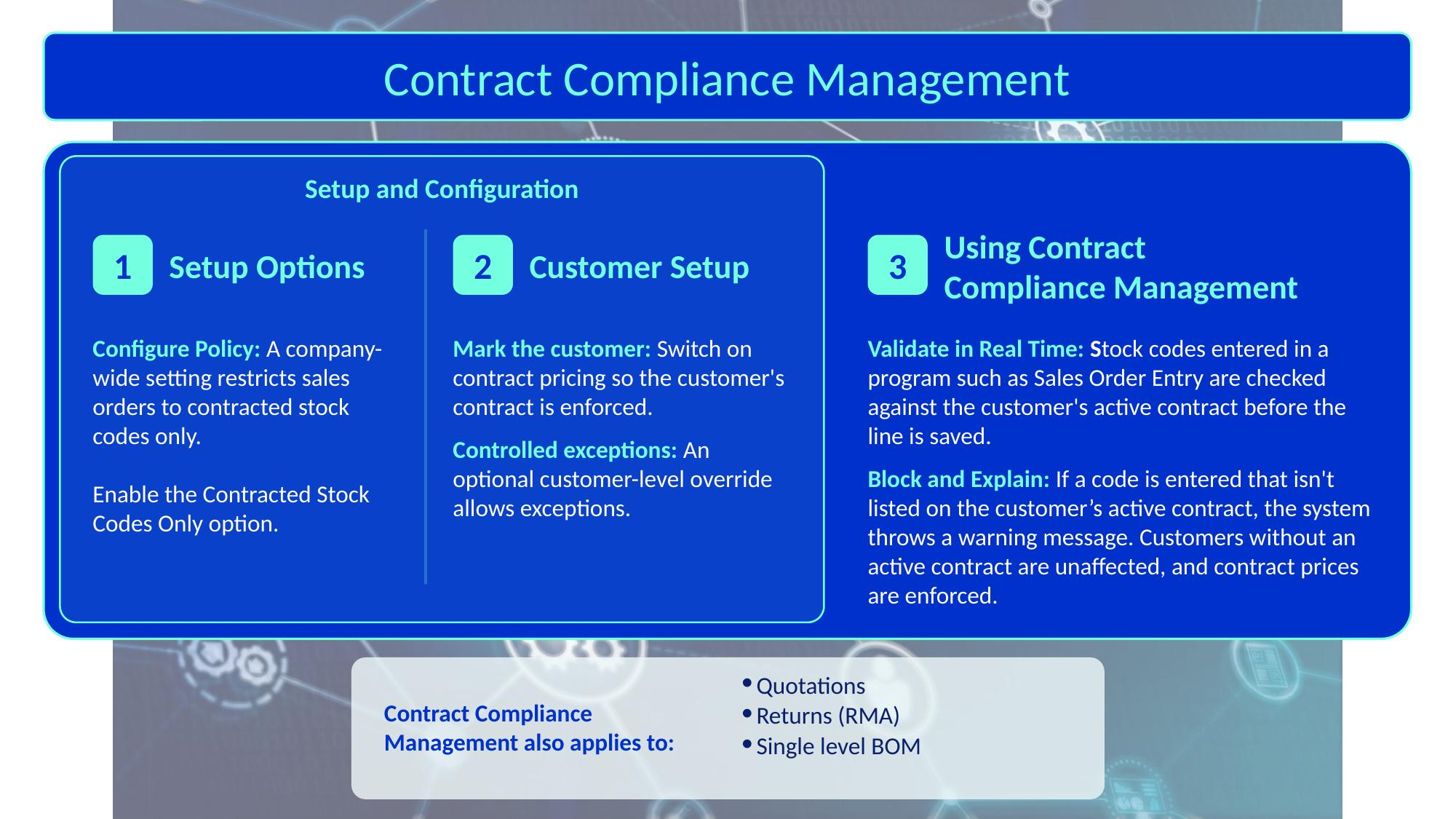
Setting up contract compliance
-
In the Setup Options program, enable the Contracted stock codes only setup option (Setup Options > Configuration > Distribution > Sales Orders).
-
In the Customers program, enable the Contract pricing option for each customer whose contract must be respected, and make sure active contracts exist for the customer or for one of its buying groups.
-
For customers who may need to bypass the controls, enable the Stock code override option for that customer. This also unlocks the price group, price code, and manual price on the customer's order lines.
How a stock code is checked
-
An operator enters a stock code, or an order is copied or imported. This happens in the Sales Order Entry Express, Sales Order Entry, Quotations, SO Single Level BOM, programs or in the SO Sales Order Import business object, or in the replacement leg of an RMA.
-
Syspro checks whether the Contracted stock codes only setup option is enabled and the Contract pricing option is enabled for the customer. If neither is enabled, stock codes will be accepted as per usual.
-
If both are enabled, the stock code is checked against the active contracts of the customer and its buying groups. A stock code that is on a contract is accepted at its contract price.
-
If the stock code is not on a contract and the Stock code override option is not enabled, a message names the stock code, the line is cleared, and the price group, price code, and manual price are disabled on the line.
-
If the stock code is not on a contract and the Stock code override option is enabled, the operator is warned and asked whether to continue. Yes keeps the line at the price it resolved to. No withdraws the line.
Affected programs
The following indicates areas in the product that may be affected by implementing this feature:
Setup programs
Setup Options
Setup Options > Configuration > Distribution > Sales Orders
Contracted stock codes only
Enable this to ensure that only stock codes and kit components with an active contract price can be added to sales orders for contract customers. Stock items without a valid contract price cannot be added.
The Stock code override option in the Customers program allows exceptions on customer level.
When you enable this option, Syspro checks stock codes against active contracts for customers that have the Contract pricing option enabled. The check applies to sales orders, quotations, RMA replacements, single level bills of materials, and imported orders.
Customers
Program List > Contact Management > Setup
Program List > Accounts Receivable > Setup
You use this program to capture and maintain details of customers required within the system. The information captured is also used in the Customer Query program.
The following indicates areas in the product that may be affected by implementing this feature:
-
The Stock code override option is new. When enabled, the customer's orders can continue past a stock code that is not on an active contract, after the operator is warned that the stock code is not on a contract.
-
While the Stock code override option is not enabled, a stock code that is not on a contract is stopped, and the price group, price code, and manual price are disabled on the customer's order lines.
-
The option takes effect as soon as the customer record is saved. It only has an effect when the Contracted stock codes only setup option is enabled for the company and the Contract pricing option is enabled for the customer.
Transaction Processing programs
Sales Order Entry
Program List > Sales Orders > Sales Order Processing
This program lets you record and maintain various types of sales orders.
The following indicates areas in the product that may be affected by implementing this feature:
-
When the Contracted stock codes only setup option is enabled, each stock code entered is checked against the active contracts of customers that have the Contract pricing option enabled. The check runs when a line is keyed, and again when an order is copied. It works the same way as in the Sales Order Entry Express program, including for kit items.
-
If the stock code is not on an active contract for the customer or one of its buying groups, the line is stopped and cleared. If the Stock code override option is enabled for the customer, the operator is warned and can continue.
-
When the Stock code override option is not enabled, the price group, price code, and manual price override are disabled on the line.
SO Single Level BOM
Sales Orders > Sales Order Processing > Sales Order Entry > Single Level Bill of Materials
You use this program to generate detail sales order lines for first level components attached to a parent item.
The following indicates areas in the product that may be affected by implementing this feature:
-
Any stock code generated or selected through this program is validated against the customer's active contracts, using the same rules as sales order entry.
-
If the stock code is not on an active contract, processing is blocked. If the Stock code override option is enabled for the customer, the operator is warned and can continue.
Quotations
Program List > Quotations > Quotations Processing
This program lets you capture and maintain a number of offers that can be presented to a customer for consideration.
The following indicates areas in the product that may be affected by implementing this feature:
-
When the Contracted stock codes only setup option is enabled, each quoted stock code is validated against the customer's active contracts, the same way as on a sales order.
-
If the stock code is not on an active contract, the quotation line is blocked. If the Stock code override option is enabled for the customer, the operator is warned and can continue.
-
This keeps quotation capture aligned with the validation a quotation faces when it is converted to a sales order.
RMA Issues and Receipts
Program List > Sales Orders > Return Merchandise > Transaction Processing
This program lets you process the transactions and documentation required when goods and/or products are returned to you by your customers.
The following indicates areas in the product that may be affected by implementing this feature:
-
Standard returns and credit notes are not checked.
-
When the Contracted stock codes only setup option is enabled and the RMA results in a cross shipment or exchange with a stocked replacement item, the replacement stock code is validated against the customer's active contracts before the exchange proceeds. If the stock code is not on a contract, processing is stopped.
-
When the Contracted stock codes only setup option is not enabled, no check runs and the replacement proceeds regardless of contract status.
RMA Detail
Sales Orders > Return Merchandise > RMA Issues and Receipts > Return Merchandise Line Details
You use this program to add and maintain RMA line details for a Return Merchandise Advice.
The following indicates areas in the product that may be affected by implementing this feature:
-
Standard returns are not checked.
-
When the Contracted stock codes only setup option is enabled and a replacement stock code is entered or maintained for a cross shipment or exchange, it is validated against the customer's active contracts.
RMA Cross Shipment
Accessible from the RMA Detail program.
The following indicates areas in the product that may be affected by implementing this feature:
-
Return lines are not restricted.
-
When the Contracted stock codes only setup option is enabled, the replacement stock code used in a cross shipment is validated against the customer's active contracts.
Sales Order Entry Express
Program List > Sales Orders > Sales Order Processing
This program lets you capture sales orders using a grid-style entry process.
The following indicates areas in the product that may be affected by implementing this feature:
-
When the Contracted stock codes only setup option is enabled, each stock code entered is checked against the active contracts of customers that have the Contract pricing option enabled. The check runs when a line is keyed, and again when an order is copied.
-
If the stock code is not on an active contract for the customer or one of its buying groups, the line is stopped and cleared. If the Stock code override option is enabled for the customer, the operator is warned and can continue, and the line keeps the stock code and its resolved price.
-
Kit items are checked according to how they are priced. For component-priced kits (type K), every mandatory component must be on a contract. For kits priced on the parent (types F and S), the parent stock code is checked like a normal stock code. Optional components that are not on a contract are excluded from the kit.
-
When the Stock code override option is not enabled, the price group, price code, and manual price override are disabled on the line.
-
When you copy an order and the Stock code override option is enabled, the copy asks its question once per copy. A view skipped lines report lists the lines that were excluded.
Query programs
Customer Query
Program List > Accounts Receivable
This program lets you view data relating to your customers in the Accounts Receivable module.
The following indicates areas in the product that may be affected by implementing this feature:
-
The Stock code override setting is displayed, read-only, so operators and support staff can see whether the customer's contract compliance is enforced strictly or with an exception.
Affected business objects
The following indicates the business objects that are affected by this feature:
Setup objects
AR Customer Maintenance
The AR Customer Maintenance business object lets you add, update or delete customers.
The following indicates areas in the product that may be affected by implementing this feature:
-
The Stock code override customer option can be maintained through this business object. It takes effect as soon as the customer is saved.
Post SO Company Setup Options
The following indicates areas in the product that may be affected by implementing this feature:
-
This business object posts and saves the company-wide Contracted stock codes only setup option, so that it can drive contract compliance validation in the affected programs and business objects.
Transaction objects
Quotation Entry and Maintenance
The Quotation Entry and Maintenance business object lets you create various offers which can be presented to the customer for consideration.
The following indicates areas in the product that may be affected by implementing this feature:
-
Quotation lines are validated against the customer's active contracts, the same way as sales order lines, when the Contracted stock codes only setup option is enabled.
-
A stock code that is not on an active contract is blocked. If the Stock code override option is enabled for the customer, a warning is returned and the quotation can continue.
Create/Update RMA Detail
The Create/Update RMA Detail business object lets you create or maintain RMA lines.
The following indicates areas in the product that may be affected by implementing this feature:
-
Standard return lines are not restricted.
-
When the Contracted stock codes only setup option is enabled, replacement stock codes used in cross shipment or exchange scenarios are validated against the customer's active contracts.
RMA Line Receipt
The RMA Line Receipt business object lets you process receipts on RMA lines.
The following indicates areas in the product that may be affected by implementing this feature:
-
Normal receipt of returned items is not restricted.
-
When the Contracted stock codes only setup option is enabled, stock codes that represent replacement or exchange stock movement are validated against the customer's active contracts.
SO Build Sales Order Line
The SO Build Sales Order Line business object lets you create a sales order line for a stocked item using the SO Sales Order Import business object. This business object returns sufficient data in order to populate the StockLine section of SO Sales Order Import.
The following indicates areas in the product that may be affected by implementing this feature:
-
Contract compliance validation is applied whenever a sales order line is built or validated, so that any stock code added to a sales order is checked the same way as in online order entry and import.
-
A stock code that is not on an active contract returns a blocking error. If the Stock code override option is enabled for the customer, a warning is returned and processing can continue.
SO Sales Order Import
The SO Sales Order Import business object lets you add a new sales order and change or cancel an existing sales order.
The following indicates areas in the product that may be affected by implementing this feature:
Imported stock codes are validated against the customer's active contracts, using the same rules as online sales order capture.
-
If the Stock code override option is not enabled for the customer, an order that contains a stock code that is not on an active contract is rejected in its entirety.
-
If the Stock code override option is enabled, the order can continue, and a warning that names the stock code is written to the XML output, so that the sending system knows contract compliance was bypassed.
-
Kits Optional components parameter (E, Y, or N): This is only relevant if single level bills of materials are in use. If set to Y, a kit item that has optional components is accepted. If set to N (the default), it is rejected. If set to E, any optional component in a kit item is excluded from the kit. When the Stock code override option is not enabled, an optional component that is not on an active contract is ignored and does not stop the kit.
-
Ignore warnings parameter (Y, N, or W): If Y, the transaction is processed. If N, the transaction is cancelled with errors. If W, the transaction is processed with warnings.
Query objects
Customer Query
The Customer Query business object lets you view information held against a customer in the Accounts Receivable module.
The following indicates areas in the product that may be affected by implementing this feature:
-
The Stock code override customer option is returned, so that consuming programs and queries can tell whether the customer is allowed to use stock codes that are not on an active contract.
Query SO Company Setup Options
The following indicates areas in the product that may be affected by implementing this feature:
-
This business object returns the value of the Contracted stock codes only setup option, so that consuming programs and business objects can tell whether contract compliance validation is active.
Copyright © 2026 Syspro PTY Ltd.