Topic: Sales Order Management

We extended the Syspro Supply Chain Portal with customer-facing Sales Order Management capability, enabling customers to create and manage orders within status-governed limits. This launches a responsive 24x7 self-service channel that reduces manual processing, increased transparency, and accelerates order-to-cash, leveraging Syspro's robust sales order controls.

Exploring
 Where it fits in?
Functional roles
Where it fits in?
Functional roles
The following functional roles are currently available from the Syspro Supply Chain Portal:
-
Request for Quote System (RFQ):
Available from Syspro 8 2019 R2
Collaborate with your suppliers by automating the quote process and servicing of the RFQ by the supplier.
-
Supplier Account Management (SAM):
Available from Syspro 8 2021 R2
Enhance your procurement activities with the provision of account management capabilities for your end-suppliers.
-
Customer Account Management (SOM):
Available from Syspro 8 2021 R2
Provide enhanced account management capabilities for your existing end-customers.
-
Sales Order Management (COM):
Available from Syspro 8 2026 R1
Empower end-customers to place and manage their own sales orders through a self-service ordering portal
These functional roles will be extended as the capabilities of the feature grows.
Benefits
Sales Order Management:
- Customer service and satisfaction are improved by giving end-customers a convenient, always-available way to place and manage their orders with full transparency throughout the process.
- Sales reach is expanded through a digital channel that captures orders anytime, from anywhere, removing the constraints of business hours and manual processes.
- Operational costs are reduced by eliminating a large portion of manual order processing, allowing your team
Functionality
Sales Order Management:
- End-customers can create, maintain, track, and pay for sales orders directly through the portal without manual intervention.
- Available order actions are determined by the current sales order status, ensuring changes align with your business rules and order life cycle.
- Complete visibility and management of each order is provided from creation through to fulfillment.
- End-customers can browse a live Product Catalog with real-time pricing, quantity breaks.
Supply Chain Portal user security
Adding portal users to your Syspro configuration provides external user access to specific functionality (using a dedicated user interface and menu system) based on the portal features available.
The portal's security ensures that the correct access is given to each portal user and that your end-supplier or customer can't access any unauthorized information.
This is achieved by each portal user being linked to a specific supplier or customer account from the Syspro company and then linked to a functional portal role. When logging in, portal users are then presented with a landing page determined by their functional role(s) that includes insights into the relevant information.
For example:
Supplier Account Management functional roles include insights such as agreed invoice terms, outstanding balances, etc.
Customer Account Management functional roles include insights such as credit standing, receivable days outstanding, etc.
Administrators can easily configure security access for each portal user by defining an operator as a portal user; configuring each portal role with the appropriate access; and assigning the correct functional roles to the portal operators.
Both SO Order Management and SO Product Catalog functionality has been built against the Customer Account Management functional role. Ensure the portal user are associated with this role. This is configured under the Portal User Management program (Program List > Administration > Security).
SO Order Management and SO Product Catalog are accessed from the Syspro Supply Chain Portal landing page, not from the standard Syspro core product Program List.
The programs are assigned to portal users via the Portal Role Application Configuration program in the Syspro core product:
-
Program List > Administration > Setup
The following Portal User Management program used to set up and main portal users are accessed from:
-
Program List > Administration > Security
Terminology
End-customer
This indicates a customer that is registered in the AR Customer Master table (ArCustomer) of your company database.
End-customers can be assigned the Customer Account Management functional role for account management capabilities within the Syspro Supply Chain Portal.
End-supplier
This indicates a supplier that is registered in the AP Supplier Master table (ApSupplier) of your company database.
End-suppliers can be assigned the Supplier Account Management functional role for account management capabilities within the Syspro Supply Chain Portal.
Entity
A third-party organization or service provider that collaborates with a company to enhance its supply chain operations and may, therefore, require access to the supply chain portal.
Portal user
Portal users are users who have access to the Syspro Supply Chain Portal.
They differ from regular Syspro operators and are configured and licensed separately based on a named-user license model.
When your system is licensed for a number of Portal Seats, an administrator can use the Portal User Management program to create and maintain portal users.
For example:
If you have a license for 1000 Portal Seats then you can create and maintain up to 1000 Active Portal Users, each of which can use the Syspro Supply Chain Portal at the same time.
This has no effect on any other Syspro user licenses.
When creating a portal user, you assign an email address as the unique identifier against which the portal user will access the portal.
A unique operator code is generated against which all transaction journals are recorded. This generated operator code is not shown to portal users, but can be viewed from within the Portal User Management program and when viewing journals and other logs of using regular Syspro functions.
Portal Seat
This is a system-wide number of named-users that can be included in your Syspro license.
You can create portal users up to the number of licensed Portal Seats.
Each portal user is a single person who has access to the Syspro Supply Chain Portal.
Add to Order
This is the action of adding a product from the SO Product Catalog to a new or existing open sales order. It is similar to the Add to Cart action on an eCommerce website. Items added in this way are stored in a cart until you proceed to checkout, which opens SO Order Management (Supply Chain Portal ) with the order pre-loaded.
Payment gateway
A payment gateway is a secure technology platform that facilitates the transfer of payment information between a customer, a merchant, and the financial institutions involved in a transaction. It acts as a digital bridge, authorizing and processing payments made through various channels (credit cards, debit cards, or digital wallets) by encrypting sensitive data and ensuring compliance with security standards.
In essence, it enables businesses to accept electronic payments safely and efficiently, whether online, in-store, or through integrated enterprise systems.
Starting
Prerequisites
Installing
This feature is installed using the Syspro Installer. To use the Sales Order Management capability within the Syspro Supply Chain Portal you must first install the Syspro Supply Chain Portal.
Security
You can secure this feature by implementing a range of controls against the affected programs. Although not all these controls are applicable to each feature, they include the following:
- You restrict operator access to activities within a program using the Operator Maintenance program.
- You can restrict operator access to the fields within a program (configured using the Operator Maintenance program).
- You can restrict operator access to functions within a program using passwords (configured using the Password Definition program). When defined, the password must be entered before you can access the function.
- You can restrict access to the eSignature transactions within a program at operator, group, role or company level (configured using the Electronic Signature Configuration Setup program). Electronic Signatures provide security access, transaction logging and event triggering that gives you greater control over your system changes.
- You can restrict operator access to programs by assigning them to groups and applying access control against the group (configured using the Operator Groups program).
- You can restrict operator access to programs by assigning them to roles and applying access control against the role (configured using the Role Management program).
Restrictions and Limits
-
SO Order Management and SO Product Catalog are Syspro Supply Chain Portal programs. They are only accessed from the Syspro Supply Chain Portal landing page and cannot be opened from the standard Syspro Program List.
SO Order Management and SO Product Catalog can be run from the standard Syspro core product, but cannot be accessed from the Program List. -
Multi-Factor Authentication and SSO using Active Directory are not currently supported for the Syspro Supply Chain Portal (i.e. an operator who is configured to use Multi-Factor Authentication or SSO using Active Directory won't be able to login to this platform).
-
Currently, the Syspro Supply Chain Portal can only be installed for a single company.
If you require portals for multiple companies, you can install the Syspro Supply Chain Portal for the first company and then install the Additional Supply Chain Portal Service for each of the additional companies.
-
The ability to customize the logo and background image of the Syspro Supply Chain Portal is not yet available, but will be included in a later release of Syspro 8.
-
Although technically possible, we don't recommend you duplicate an email address of a portal user amongst non-portal users.
For this reason the Portal User Management and Operator Maintenance programs prevent you from entering a duplicate email address amongst all operators (of any type).
-
The ability to print documents from the Syspro Supply Chain Portal is only available with Server-side Reporting.
-
Archiving functionality is disabled when printing documents from the Syspro Supply Chain Portal (even if the archiving flag against the template being used is enabled).
Solving
FAQs
General
Where do I find the URL for the Syspro Supply Chain Portal?
Once you have installed the Syspro Supply Chain Portal you can view the URL link from the following location of the machine to which the software is installed:
\inetpub\wwwroot\SYSPROSupplyChainPortal_"companyID"\index.html
However, the URL used for the Syspro Supply Chain Portal is:
http://{DNS_Name}/SYSPROSupplyChainPortal_{CompanyId}, as configured against the Supply chain portal URL setup field within the Setup Options program (Setup Options > Company > General).
What is the recommended browser to use for the Syspro Supply Chain Portal?
Although you can use any browser, we recommend Google Chrome as all of Syspro's development and testing is performed on Google Chrome.
Due to non-standardization among browsers, it isn't possible to test on every browser available. We test on Google Chrome due to it currently having the largest user base by a very large margin.
Sales Order Management
Can I copy a previous Sales Order?
Yes. SO Order Management includes a Copy Order function that lets you duplicate a previous sales order as the basis for a new one. You select the source order from the sales order listview.
How is pricing determined in the SO Product Catalog?
SO Product Catalog uses the SO Product Catalog Query business object to determine the price shown on each product tile. If the customer is not using the price lists, the best available base price is shown together with quantity breaks, where applicable. If a TPM promotion applies, the promotional price is shown.
Where multiple promotions apply, the best price is displayed.
Ensure that price lists and promotions are configured in the simplest possible structure for portal-facing customers.
Using
Process
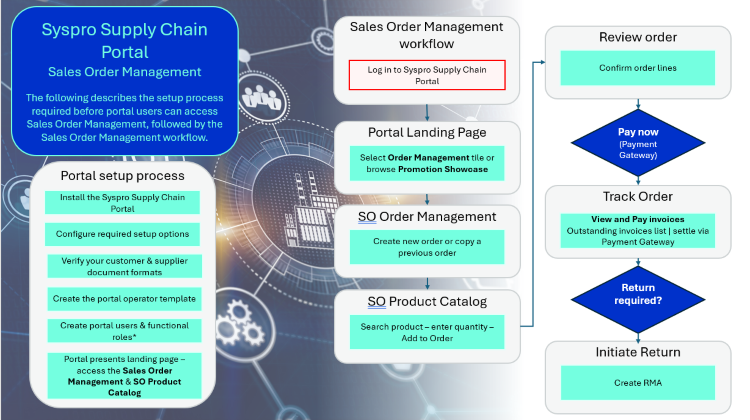
Portal setup process
-
Ensure that the Syspro Supply Chain Portal installation and configuration process has been followed before starting to use the Sales Order Management capability.
Sales Order Management workflow
The following depicts the Sales Order Management workflow for a portal user:
-
Log in to Syspro Supply Chain Portall
-
Portal users (Customers) can log in to Syspro Supply Chain Portal with their portal user account.
-
Both SO Order Management and SO Product Catalog functionality has been built against the Customer Account Management functional role.
-
Ensure the portal user (Customer) are associated with this role. This is configured under the Portal User Management program (Program List > Administration > Security).
-
-
From the portal landing page under Customer account management, select the Order Management tile to open SO Order Management.
The Product Catalog tile is also available under Customer account management. -
In SO Order Management, create a new sales order by selecting the Add New Order button or select Copy Order to duplicate an existing order.
-
Add order lines by selecting the Insert New Line button. Once the line is added select the Search Product hyperlink to open SO Product Catalog. Search for the required product, and select Add to Order to add them to your order.
Items in the Product Catalog are set up in either the Pricing Engine or in your Trade Promotionscatalog. -
Enter the desired quantity in the Quantity field.
-
The Total price list price will depend on the Trade Promotions, contract pricing and price lists configured and apply the appropriate price accordingly.
-
Select Save to save the order.
-
Optionally upload the customer purchase order document against the sales order as an attachment.
-
Select Pay Now to pay immediately using the Payment Gateway, or save the order for later settlement.
-
From the SO Order Management order listview, track the order status. Select an order to send messages, chase delivery, or amend the delivery schedule.
-
Once delivery is received, upload the proof of delivery document against the completed order.
-
View and pay outstanding invoices from the invoice list within SO Order Management.
-
To process a return, select the return function against a completed order in SO Order Management. This creates an RMA for warehouse processsing.
-
Select the audit log for any order to view a complete, read-only history of all changes made to that order.
Affected programs
The following indicates areas in the product that may be affected by implementing this feature:
Setup programs
Operator Maintenance
Syspro Ribbon bar > Setup > Operators
The program includes the following operator fields that are related to this feature:
Reset your toolbar to ensure that all the latest options are visible.
-
Operator type
Portal indicates that the operator is a named user (used only for the Syspro Supply Chain Portal).
-
Operator status
This indicates the current status of the operator (as recorded in the OperatorStatus column of the AdmOperator table):
Active
This indicates that the portal user is active and can log into the Syspro Supply Chain Portal.
Disabled
This indicates the portal user was disabled using the Portal User Management and cannot log into the Syspro Supply Chain Portal.
Removed
This indicates the portal user was removed using the Portal User Management program and cannot log into the Syspro Supply Chain Portal.
-
Portal supplier
This indicates the supplier code that must be assigned to the portal user when accessing the Syspro Supply Chain Portal.
-
Portal customer
This indicates the customer code that must be assigned to the portal user when accessing the Syspro Supply Chain Portal.
-
Configure portal operators per company
This lets you capture a portal customer and portal supplier against the operator (per company) using the Configure Portal User per Company program.
-
Entity user type
Indicate whether the user is an administrator:
-
Blank/none – not an entity user
-
Administrator
-
Third-party user
-
-
Entity
Indicate the name of the entity to which the operator belongs if they are a portal user.
-
Approved status
Indicate the user’s approval status.
-
Rejected reason
Indicate the reason if the user’s approved status is rejected.
Portal User Management
Program List > Administration > Security
This program lets administrators create and manage portal operators that require access to the Syspro Supply Chain Portal.
Things you can do in this program include:
-
Create portal operators
-
Configure functional roles for portal users
-
Disable portal operators
-
Remove portal operators
-
Activate disabled or removed portal operators
-
Delete portal operators
-
View portal entity details
Add Portal User
Accessible from the Add Portal User function of the Portal User Management program
This program lets administrators create new portal users that require access to the Syspro Supply Chain Portal.
Portal User Role Management
Accessible from the Maintain role hyperlink of the Role action column in the Portal User Management program
This program lets administrators configure the functional roles for a portal user that requires access to the Syspro Supply Chain Portal.
The functional roles available for configuration include:
-
Request for Quote System (RFQ)
-
Customer Account Management (CAM)
-
Supplier Account Management (SAM)
-
Sales Order Management (COM)
Transaction Processing programs
SO Order Management
Supply Chain Portal
This program lets portal users assigned with the Customer Account Management functionality role create, maintain, track, and pay for sales orders related to their specific customer account via the Syspro Supply Chain Portal.
SO Product Catalog
Supply Chain Portal
This program lets portal users assigned with the Customer Account Management functionality role browse and search available stock items with live pricing, quantity breaks, and promotions, and add products directly to a sales order via the Syspro Supply Chain Portal.
Affected business objects
The following indicates the business objects that are affected by this feature:
Query objects
SO Product Catalog Query
The SO Product Catalog Query business object lets you retrieve stock items with live customer pricing, quantity breaks, and promotions for display in the SO Product Catalog program.
It is also used to return current and upcoming promotional products for the Promotion Showcase on the Syspro Supply Chain Portal
Copyright © 2026 Syspro PTY Ltd.