Topic: Quality Documentation

We introduce a new feature called Quality Documentation, a governed, template-driven library embedded with the Quality Management module that produces Quality Documentation, such as Certificate of Conformance (CoC)), Quality Assurance Plans, Inspection and Test Reports, and Supplier Quality Agreements, surfacing alongside inspections and job records for auditable traceability. This centralized, version-controlled content streamlines compliance and accelerates cross-functional collaboration.

Exploring
 Where it fits in?
Benefits
Where it fits in?
Benefits
-
Standardized quality documentation. Enables the generation and printing of essential quality documents, using consistent, system-controlled formats.
-
Centralized control and accessibility of quality documents. Brings the creation and management of quality documentation into a single, integration area within Quality Management.
-
Improved traceability and audit support. Links quality documents directly to inspections, stock items, lots, serials, jobs, making it easier to retrieve accurate documentation for audits, recalls and investigations.
-
Helps minimize compliance gaps by ensuring quality documentation is generated from validated system data and follows standardized formats across processes and departments.
Functionality
-
A central library provides templates for Certificate of Conformance, Certificate of Analysis, and inspection reports.
-
Users configure and customize templates to generate documents quickly from standardized formats.
-
Integration with Quality Management workflows ensures documentation availability during inspection, production, and supplier processes.
The programs related to this feature are accessed from the Program List of the Syspro menu:
Program List > Quality Management > Documents
Terminology
Certificate of Conformance (CoC)
This certifies that finished goods meet specified standards, regulations, or customer requirements.
Finished Goods Inspection Report (FGIR)
Records detailed inspection results for completed products (Jobs and Purchase Order Receipts). This can be printed as a standalone document or alongside the Certificate of Conformance (CoC).
Incoming Goods Inspection Report (IGIR)
This report display the results of inspections performed on goods received from a supplier before they enter production. Typically, generated from PO receipt inspection data (from Jobs and Purchase Order Receipts).
Certificate of Analysis (CoA)
Documents analytical test results (chemical composition, physical properties) for raw materials or components received from a supplier. This document certifies that the product has been tested against the set quality criteria as configured in the quality tests.
Lot Traceability Report
This report provides a comprehensive record of a batch or lot's journey through production and supply chain, supporting audits, recalls, and regulatory compliance. Detailing the input raw material, where applicable, as well as the processes completed against the lot.
Unique Facility Identifier (FID)
A 50-character identifier for a warehouse or work center, used to support EU Digital Product Passport (DPP) traceability requirements.
Starting
Prerequisites
Ensure Quality Management is available and stock codes are configured as QM inspection required.
Stock Code Maintenance
To use this feature, the following setup option(s) must be enabled/defined:
Program List > Inventory > Setup - Tracking pane:
-
Quality management
-
QM inspection required
-
-
Lot traceability control
-
Lot traceability
This must be defined as Inspection required.
-
Traceable
This must be defined as With inspection.
-
Allow issues from multiple lots
-
Solving
FAQs
How do I set up Quality Documentation?
To use Quality Documentation, you must complete a once-off setup process to define document formats, configure inspection tests, control which inspection results are included on each document, and ensure inspections are completed before printing.
To set up Quality Documentation:
-
Ensure Quality Management is available and stock codes are configured as QM inspectable.
-
Stock Code Maintenance
To use this feature, the following setup option(s) must be enabled/defined:
Program List > Inventory > Setup - Tracking pane:
-
Quality management
-
QM inspection required
-
-
Lot traceability control
-
Lot traceability
This must be defined as Inspection required.
-
Traceable
This must be defined as With inspection.
-
Allow issues from multiple lots
-
-
-
-
Define quality document formats
-
Use Quality Document Format (Program List > Quality Management > Documents ) to define the formats for each supported document type (for example, Certificate of Conformance).
-
The Quality Document Format process is as follows:
-
Select the document type you want to define:
-
Certificate of Conformance
-
Finished Goods Inspection Report
-
Incoming Goods Inspection Report
-
Certificate of Analysis
-
Lot Traceability Report
These documents are intended to provide formal proof of quality outcomes.
-
-
In the format options, select the Print date format.
-
Use SRS options to select the report definition to be used for this document type.
-
Save the format definition. The stored format will be applied when printing the selected document type.
-
-
-
Configure Inspection Test Design
-
In Inspection Test Design (Program List > Quality Management > Setup), specify which inspection test captions and results must be included on each document type by selecting the applicable Include in certificate options.
-
Capture regulatory standards where required.
-
-
Maintain facility identifiers (if applicable)
-
Capture the Unique Facility Identifier (FID) against warehouses (and optional work centres) in Warehouse Maintenance (Program List > Inventory > Setup > Warehouses) to include facility traceability information on quality documents.
Unique Facility Identifier (FID)
A 50-character identifier for a warehouse or work center, used to support EU Digital Product Passport (DPP) traceability requirements.
-
Once these steps are completed, the system is ready to generate quality documentation during operational processing.
How do I generate and print Quality Documentation?
Quality documents are generated after inspections are completed and are printed using the relevant Quality Documentation print programs.
To generate and print quality documentation:
-
Perform and complete inspections:
-
Flag inspection tests in the Inspection Test Design program for inclusion in Quality Documentation. These settings control which tests results are included on documents such as the Certificate of Conformance, which can only be generated once all required inspection tests are completed.
-
Complete inspections using standard Quality Management processes. Quality documents can only be generated once all required inspection tests are completed.
-
-
Select the relevant print program based on the inspection type:
-
WIP Quality Inspection Print for WIP-related documents (for example, CoC or FGIR)
-
PO Quality Inspection Print for purchase order inspections (for example, IGIR or CoA)
-
Lot Traceability Tracking Print for batch/lot/serial traceability documentation.
-
-
Apply selection criteria and
-
Enter the required selection criteria (such as stock code, job, purchase order, lot or serial) and print the selected quality document.
-
Using
Process
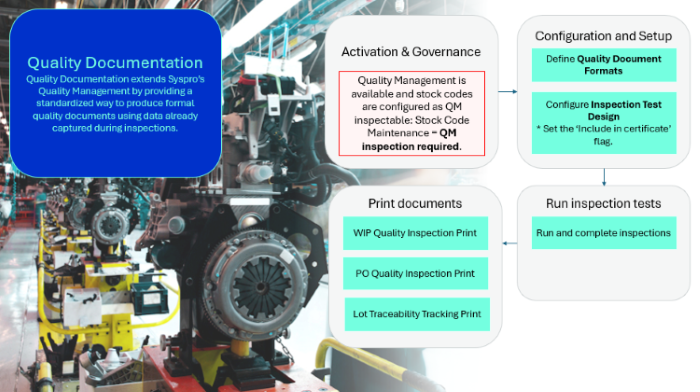
Considerations
-
Enable the QM inspection required option within the Stock Code Maintenance program.
The Lot traceability option will automatically be defined as Inspection required and the Traceable option as With inspection.
Configuration and Setup
-
Ensure Quality Management is available and stock codes are configured as QM inspectable.
-
Use Quality Document Format (Program List > Quality Management > Documents ) to define the formats for each supported document type (for example, Certificate of Conformance).
Quality Document Format is the central setup program for Quality Documentation. It stores the configuration that controls how each document type is printed - the date format and the SRS report layout it calls. You must define a format for every document type you intend to use.Quality Document Format
The Quality Document Format process is as follows:Select the document type you want to define:Certificate of ConformanceFinished Goods Inspection ReportIncoming Goods Inspection ReportCertificate of AnalysisLot Traceability ReportThese documents are intended to provide formal proof of quality outcomes.In the format options, select the Print date format.Use SRS options to select the report definition to be used for this document type.Save the format definition. The stored format will be applied when printing the selected document type.
-
Design and create the inspection tests using the Inspection Test Design program (Program List > Quality Management > Setup).
Inspection Test Design
Each quality document draws its tests results from the inspection data captured against the inspection test design. Control which test captions appear on which document by setting the including flags under Include in certificate. Applicable regulatory standards can also be captured in Regulatory Standards.
Run inspection tests using the Inspection Engine
-
Depending whether you are inspecting purchased or manufactured items, receipt items into inspection and count the received quantities using the Purchase Order Receipts or WIP Inspection Maintenance program.
-
Select the inspection level using the Inspection Level Select program.
This program will only be displayed if the Sample basis field is defined as Sample quantity within the Inspection Level Review program.
-
Once the inspection level is selected, the following fields within the Purchase Order Receipts or WIP Inspection Maintenance program are updated:
-
The QM inspection status reflects Y - In progress, as the items have been counted.
-
The number of items that must be inspected is reflected at the Quantity in quarantine field.
-
-
Inspect the items and submit the results of the sample tests using the Inspection Test Queue program.
Once all the quarantined items are inspected and the test results submitted, the Inspection complete field displays Yes and the Inspection status is updated to Y - Passed inspection or N - Failed inspection.
-
Accept items into stock (or scrap, send for rework, reject, or QM return items) using the the Purchase Order Receipts or WIP Inspection Maintenance programs.
The QMS inspection status reflects C - Complete.
Print documents
Quality documents are generated after inspections are completed and are printed using the relevant Quality Documentation print programs.
To generate and print quality documentation:
-
Perform and complete inspections:
-
Flag inspection tests in the Inspection Test Design program for inclusion in Quality Documentation. These settings control which tests results are included on documents such as the Certificate of Conformance, which can only be generated once all required inspection tests are completed.
-
Complete inspections using standard Quality Management processes. Quality documents can only be generated once all required inspection tests are completed.
-
-
Select the relevant print program based on the inspection type:
-
WIP Quality Inspection Print for WIP-related documents (for example, CoC or FGIR)
-
PO Quality Inspection Print for purchase order inspections (for example, IGIR or CoA)
-
Lot Traceability Tracking Print for batch/lot/serial traceability documentation.
-
-
Apply selection criteria and
-
Enter the required selection criteria (such as stock code, job, purchase order, lot or serial) and print the selected quality document.
-
Affected programs
The following indicates areas in the product that may be affected by implementing this feature:
Setup programs
Quality Document Format
Program List > Quality Management > Documents
Use this program to define and maintain the document formats for each Quality Documentation type, storing format and date settings used when generating quality documents.
Inspection Test Design
Program List > Quality Management > Setup
This program lets you design your own inspection tests that are used in the Quality Management module when inspecting work in progress (WIP) and purchase order receipts.
The following indicates areas in the product that may be affected by implementing this feature:
-
The program has been updated with a new section that allows you to flag inspection tests for inclusion in Quality Documentation. These settings control which tests results are included on documents such as the Certificate of Conformance, which can only be generated once all required inspection tests are completed.
Warehouse Maintenance
Program List > Inventory > Setup
This program lets you capture and maintain details of warehouses required within the system.
The following indicates areas in the product that may be affected by implementing this feature:
-
The program was enhanced by adding a new field, Unique Facility Identifier (FID), used to support traceability requirements.
Batch programs
Inspection Test Queue
Program List > Quality Management > Inspection > Transaction Processing
This program displays all sample tests that were created using the Inspection Test Design program and allows inspectors to update the tests assigned to them.
The following indicates areas in the product that may be affected by implementing this feature:
-
The program has been enhanced with a print link in the Inspection detail pane (enabled once all tests are complete) that launches the relevant WIP Quality Inspection Print or PO Quality Inspection Print print programs, and it can optionally display the Regulatory standards for the inspection.
Report programs
WIP Quality Inspection Print
Program List > Quality Management > Documents
This program is used to generate and print Certificate of Conformance (CoC) and Finished Goods Inspection Reports (FGIR) for Work in Progress finished goods inspections.
PO Quality Inspection Print
Program List > Quality Management > Documents
This program lets you generate and print Incoming Goods Inspection Reports (IGIR) and Certificate of Analysis (CoA) for purchase order receipts inspections.
Lot Traceability Tracking Print
Program List > Quality Management > Documents
This program lets you generate and print the Lot Traceability Tracking report (LTTR) for a selected stock code and lot or serial number.
Query programs
Inspection Dashboard
Program List > Quality Management > Inspection
This dashboard program is used by quality managers to view inspection information, e.g. test results and inspection quantities.
The following indicates areas in the product that may be affected by implementing this feature:
-
The program has been enhanced with a print link in the Inspection details pane (enabled only once all tests are completed) that launches the appropriate WIP Quality Inspection Print or PO Quality Inspection Print print programs.
Affected business objects
The following indicates the business objects that are affected by this feature:
Setup objects
Work Center Maintenance
The Work Center Maintenance business object is used to add a new work center and to update or delete an existing work center.
Inventory Warehouse Maintenance
The Inventory Warehouse Maintenance business object lets you add, maintain and delete warehouses.
Query objects
Lot Traceability Up & Down Query object
The Lot Traceability Up & Down Query object business object allows you to query lots.
Copyright © 2026 Syspro PTY Ltd.