Topic: QM In-Process Inspections

We added in-process QMS inspections integrated with WIP. A BOM-operation flag triggers manual/automatic checks, within the Inspection Engine applying configured tests and pass/fail criteria and linking results to jobs. Progression can be blocked on failure, bringing earlier, standardized control and traceability for faster, more confident decisions.
In-process inspection sits within the Quality Management module and operates alongside Work In Progress (WIP) and Bill of Materials (BOM) / Structures and Routing. It connects the production execution layer (Labor Posting), with the quality testing layer, so quality checks become part of the natural manufacturing workflow.

Exploring
 Where it fits in?
The feature supports two core production scenarios:
-
Single job with multiple operations: Inspections trigger between operations based on the completed pieces quantity posted against each inspectable operation.
-
Multi-level jobs: Inspections occur when the output of a sub-job is received as a material requirement into a parent job, ensuring sub-assembly quality before further processing.
Benefits
-
Detects non-conformance earlier in the manufacturing cycle so issues can be addressed before additional time, labor, and materials are committed.
-
Reduces reliance on manual inspection steps or external workarounds by providing an integrated in-process inspection capability.
-
Improves real-time visibility and accountability on the shop floor by capturing inspection results as part of labor posting and using those outcomes to control progression.
-
Improves product quality and first pass yield by catching defects earlier in production rather than at final inspection.
-
Increases throughput and on-time delivery with faster pass/fail decisions and real-time production quality visiblity.
Functionality
-
An in-process inspection requirement can be set at the Bill of Materialsoperation level to trigger quality checks at defined points during production.
-
The system initiates the inspection using the existing quality Inspection Engine framework, and records inspection results against the WIP job to provide and-to-end traceability.
-
Configurable controls let you restrict operation progression or WIP posting based on inspection pass/fail outcomes.
This program can't be run standalone and is accessed from the following program(s):
- Structures and Routings (Program List > Bill of Materials > Setup)
- Inspection Level Review (Program List > Quality Management > Processing
- Inspection Test Queue (Program List > Quality Management > Inspection > Transaction Processing)
- WIP Job and Op Maintenance / WIP Add an Operation
Terminology
In-process inspection
Inspection performed during production at defined operation points, before work proceeds to the next stage.
Inspection Level (In-process)
A configuration that determines the tests and sampling rules for inspection at operation level.
Acceptance quality limit (AQL)
The acceptance quality limit is the level of defect that the business can accept in its product.
AQL sampling helps a business determine whether to accept or reject an order based on the number of defects found in the sample size. Every business needs to decide what the critical, major and minor defects are on its components, and what level of defects it can accept in its processes.
You can specify the accept / reject quantity for critical, major and minor defects within the Acceptance Quality Limit program.
Inspection test
The inspection test, also called inspection level test, is the test for the actual inspection of an individual item. Inspection tests are assigned to the sample test, which includes all inspection tests of the item. Once all individual inspection tests are done, the sample test is complete.
The test data, status and results of the individual inspection level tests are saved within the SqmIndTest table.
Quality Management Inspection
This encompasses the entire inspection that is performed on a purchase order or job that is received into inspection.
The inspection data, status and the results are saved within the SqmInspect table.
Work in Progress (WIP)
WIP is an abbreviation used for work in process, work in progress, goods in process, or in-process inventory which are a company's partially finished goods waiting for completion and eventual sale. These items are either just being fabricated or waiting for further processing in a queue or buffer storage.
Bill of Materials (BOM)
A Bill of Materials (BOM) defines the manufacturing structure for a stock item and the operations (routing steps) used to produce it.
In the In-Process Inspection solution, the BOM is extended so that inspection requirements can be defined at operational level, allowing quality checks to be embedded at specific points during production rather than only at the end of the job.
Starting
Prerequisites
To use this feature, the following setup option(s) must be enabled/defined:
Ensure Quality Management is available and stock codes are configured as QM inspection required.
-
Stock Code Maintenance
To use this feature, the following setup option(s) must be enabled/defined:
Program List > Inventory > Setup - Tracking pane:
-
Quality management
-
QM inspection required
-
-
Lot traceability control
-
Lot traceability
This must be defined as Inspection required.
-
Traceable
This must be defined as With inspection.
-
Allow issues from multiple lots
-
-
-
Setup Options
To use this feature, the following key fields must be set for operation inspection numbers.
Setup Options > Keys > Manufacturing
-
Operation inspection
-
Suppress leading zeros
This suppresses the display of zeros that appear before the numeric key.
-
Presentation length
This restricts the number of characters that can be entered or displayed in a key field.
-
Restrictions and Limits
-
In-Process Inspection is controlled at operational level, not at stock code level.
-
Inspections are only triggered when labor posting records completed pieces.
-
Jobs cannot proceed past locked inspection points until all tests are completed.
Solving
Error messages
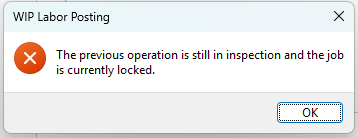
WIP Labor Posting
Cause
This message is displayed if labor was posted against an inspectable operation where the Lock Job in Inspection flag is set to Yes.
Solution
Complete all outstanding inspection tests in Inspection Test Queue. After all tests are marked complete, the lock clears automatically. Then use the Release Job function in WIP Job and Op Maintenance / WIP Add an Operation to allow processing to continue.
Inspection level not found for this operation
Cause
This message is displayed when no In-Process Inspection level has been configured in Inspection Level Review for the composite key: Parent Stock Code + Version/Release/Route/Operation.
Solution
Configure an In-Process Inspection level for the operation in Inspection Level Review (Program List > Quality Management > Processing). Set Inspection Type to In-Process (I), Source Type to Route/Operation (R), and enter a valid Stock Code, Version, Release, Route, and Operation values.
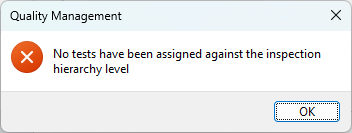
No tests are defined for this operation
Cause
This message is displayed when an inspection level exists for the operation but not tests have been assigned to it.
Solution
Open the inspection level record in Inspection Level Review and assign the required tests (designated in Inspection Test Design). Save and retry the labor posting.
 FAQs
Where can I enable the Inspection Engine?
FAQs
Where can I enable the Inspection Engine?
The Inspection Engine that is used by the Quality Management module is enabled against the stock code.
-
Access the Stock Code Maintenance program.
-
At the Tracking pane enable the QM inspection required option.
This option is only available if the Lot traceability option is defined as Inspection required.
Once that is defined, the Traceable option will be updated to With inspection and the Allow issues from multiple lots will be enabled.
-
Save your changes.
You won't be able to save your changes if there is stock on hand for the selected stock code or if the stock code was allocated to a sales order that has not been completed.
How do I start with In-Process Inspection?
In-Process Inspection sits within the Quality Management module and operates alongside Work in Progress (WIP), and Bill of Materials (BOM). It connects the production execution layer (Labor Posting), with the quality testing layer, so quality checks become part of the natural manufacturing workflow.
-
Ensure Quality Management is available and stock codes are configured as QM inspection required within Stock Code Maintenance.
-
Design and create the inspection tests using the Inspection Test Design program
-
In Setup Options (Setup Options > Keys > Manufacturing), the Operation Inspection number sequence must be configured.
-
Operations that require In-Process Inspection must be flagged in Structures and Routings. For each relevant operation, enable the In-process inspection checkbox and set the Lock job in inspection option as required.
-
At least one In-Process Inspection level must be configured in Inspection Level Review for each inspectable operation.
-
Use Labor Posting (or Labor Capture Avanti UI) to post completed pieces and capture inspection results.
-
Inspect the items and submit the results of the sample tests using the Inspection Test Queue
-
Review the results in Labor Posting after inspection is complete, then post Quantity Passed or Quantity Failed.
Does In-Process Inspection affect finished goods inspection?
No. In-Process Inspection is a separate process that runs alongside existing finished goods inspection. Existing QM Inspection processes, inspection levels, and tests for finished goods are not affected by this feature.
Where can I see inspection results after tests are completed?
Completed inspection results, including quantity inspected, quantity passed, and quantity failed, are visible in the Labor Posting program when an operation with completed inspection is selected.
Results are also accessible from the Inspection Test Queue program.
Using
Process
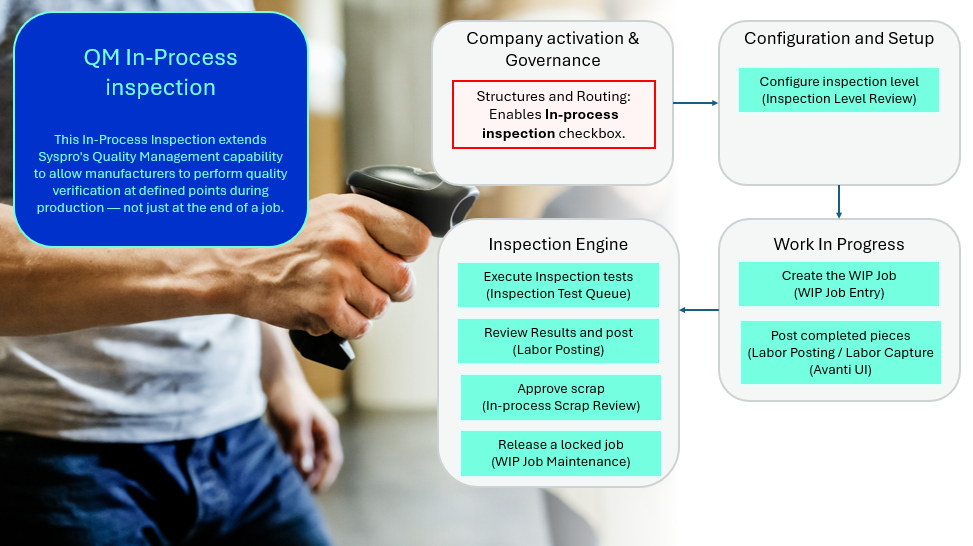
The following describe the end-to-end flow for In-Process Inspection from configuration through to scrap approval.
Configuring and setup of In-Process Inspection
-
Ensure that you have configured the relevant eSignatures required for the Quality Management, as these are denied by default if the Secure by Default option is enabled (Global configuration tab within the Electronic Signature Configuration Setup program)
-
Enable the QM inspection required option within the Stock Code Maintenance (Program List > Inventory > Setup) program.
-
In Setup Options > Keys > Manufacturing,the Operation inspection number sequence must be configured. Set , Presentation length, and whether to Suppress leading zeros. This number is to uniquely identify each In-Process Inspection instance.
-
Design and create the inspection tests using the Inspection Test Design program.
-
Operations that require In-Process Inspection must be flagged in Operations Maintenance (Structures and Routings (Program List > Bill of Materials > Setup)) using the BOM Routing Maintenance business object. For each relevant operation, enable the In-process inspection checkbox and set the Lock job in inspection option as required.
-
Assign the inspection tests that should be executed per inspection level in Inspection Level Review and create an inspection level for the operation, i.e. the warehouse, stock code, customer or supplier. Once added, the test is displayed in the Inspection Level Tests pane.
At least one In-Process Inspection level must be configured in Inspection Level Review (Program List > Quality Management > Processing) for each inspectable operation. The level must use Inspection Type = In-process (I) and Source Type=Route/Operation (R), with a valid Stock code, Version, Release, Route, and Operation specified. Tests must be assigned to each inspection level.-
Set Inspection Type to In-Process (I)
-
Set Source Type to Route/Operation (R)
-
Enter the Parent Stock code, Version, Release, Route, and Operation.
-
Set the inspection mode: Full, Single, or AQL-based sampling.
-
Assign the required test to the inspection level.
-
Using In-Process Inspection
-
Work in Progress
-
When a WIP job is created from the BOM using Job Entry, the In-Process Inspection flags (In-process inspection and Lock job in inspection) are automatically copied from the BOM operations to the labor allcocation records for the job.
-
The completed pieces must be posted against an operation and the completed pieces quantity be entered in Labor Posting (Program List > Work in Progress > Job Postings) (or the Labor Capture Avanti UI). If the operation is flagged for in-process inspection:
-
SQM Inspection Creation business object will be called and the inspection level will load.
-
-
-
Execute Inspection tests
-
Open Inspection Test Queue (Program List > Quality Management > Inspection > Transaction Processing) and select the In-Process Inspection filter to view outstanding in-process tests.
-
Inspect the items and submit the results of the tests.
-
Test are executed and results are recorded against each unit. When all tests for the operation are completed, the job inspection status flag will be cleared.
-
-
Review results and post
-
Open Labor Posting to continue the operation after the inspection is complete. The inspection summary will display the results:
-
Quantity Inspected
-
Quantity Passed
-
Quantity Failed
-
Test Status
-
-
Quantity Passed items can be posted as completed pieces and progresses to the next operation.
-
Quantity Failed items are posted as scrap, using WIP cost (Quantity scrapped) to the point of failure.
The system uses the WIP cost per piece accumulated to that operation to value the scrap transaction.
-
-
Approve scrap
-
The Quantity scrapped will be posted.
Currently we don't look at rework. In-process inspection items can either scrapped (Quality scrapped) or accepted (Quality completed).
-
-
Release a locked job
-
If the operation had the Lock job in inspection flag set, the job remains locked after inspection tests are completed and until a supervisor releases (with WIP Job maintenance esignature access) it.
-
Accept items into stock (or scrap, send for rework, reject, or QM return items) using the WIP Job and Op Maintenance / WIP Add an Operation release job function to clear the lock.
-
Once released, labor postings can continue on subsequent operations.
-
Status Codes
QM inspection statuses
The following are possible status codes for a QM inspection used within the Quality Management:
| Status | Description |
|---|---|
|
R - Not started |
When a job is moved into inspection, the status of the QMS inspection is displayed as R - Not started as the count transaction must first be performed. |
|
Y - In progress |
This status is applied once the count transaction has been completed. |
|
C - Complete |
This status is displayed once all the sample tests and the QMS inspection have been completed. |
|
N - Not required |
This status code is displayed when a stock code is selected that requires inspection, and the QM inspection required option at the Tracking pane within the Stock Code Maintenance program is not enabled (i.e. the inspection will not be done using the Quality Management module). |
|
{blank} - Not required |
This status code is displayed when the Quality Management module is not installed. |
For purchase order inspections, the inspection statuses are saved within the InvInspect table and displayed at the Inspection status field of the Purchase Order Inspection program.
For Work in Progress inspections, the inspection statuses are saved within the WipInspect table and displayed at the QMS inspection status field of the WIP Inspection program.
Affected programs
The following indicates areas in the product that may be affected by implementing this feature:
Setup programs
Structures and Routings
Program List > Bill of Materials > Setup
This program lets you define your bills of materials (i.e. the elements required in a sequence of manufacturing operations, as well as the structural relationships between parent and component parts).The following indicates areas in the product that may be affected by implementing this feature:
Operations Maintenance has been enhanced by adding an In-process inspection checkbox to operation records. A second checkbox, Lock job in inspection, can be set to control whether the job is locked while inspection is performed.
The In-process inspection and Lock Job in inspection flags will update the BomOperations and EccOperations tables.These new settings respect the existing security and eSignature controls, and changes to the in-process inspection flag are logged to the audit trail
WIP Job and Op Maintenance
You use this program to maintain existing operation allocations for a job.
The following indicates areas in the product that may be affected by implementing this feature:
-
Internal Operation Details has been enhanced by adding an In-process inspection checkbox to operation records. A second checkbox, Lock job in inspection, can be set to control whether the job is locked while inspection is performed.
WIP Add an Operation
You use this program to add operation allocations to a job.
The following indicates areas in the product that may be affected by implementing this feature:
-
Internal Operation Details has been enhanced by adding an In-process inspection checkbox to operation records. A second checkbox, Lock job in inspection, can be set to control whether the job is locked while inspection is performed.
Transaction Processing programs
Job Entry
Program List > Work in Progress > Job Postings
This program lets you create and maintain jobs in the Work in Progress module, as well as maintain material and operation allocations for jobs.The following indicates areas in the product that may be affected by implementing this feature:
When operations are added to a job from the Bill of Materials (BOM), the In-process inspection and In-process inspection, and original BOM operation number are copied to the labor allocations record
Labor Posting
Program List > Work in Progress > Job Postings
This program lets you post time against a specific job.
The following indicates areas in the product that may be affected by implementing this feature:
-
Enhanced to trigger inspection creation on completed pieces entry for inspectable operations. Display inspection results after tests are completed and enforce the job lock configured.
Batch programs
Inspection Level Review
Program List > Quality Management > Processing
This programs lets the quality supervisor or manager assign the tests that will be executed per hierarchy level according to inspection type, warehouse, stock code or supply chain (customer or supplier) and to define the sample basis used for tests.
The following indicates areas in the product that may be affected by implementing this feature:
-
New In-process inspection type (I) and Route/Operations source type (R) added. New fields for Version, Release, Route, and Operation. A new radio button was also added for the In-Process Inspection process.
Inspection Test Queue
Program List > Quality Management > Inspection > Transaction Processing
This program displays all sample tests that were created using the Inspection Test Design program and allows inspectors to update the tests assigned to them.
The following indicates areas in the product that may be affected by implementing this feature:
-
New In-Process Inspection filter checkbox added to the include section. When in-process tests are completed, the job inspection status flag is cleared.
Affected business objects
The following indicates the business objects that are affected by this feature:
Setup objects
BOM Routing Maintenance
The BOM Routing Maintenance business object is used to maintain both internal and subcontract operations against an existing parent stock code, revision, release and route. The method used dictates which maintenance function is being performed on operations.
Additional information
Operations are used in SYSPRO to document the work that is required to manufacture a parent part. The details held against an operation include the sequence, the work center (which may refer to a subcontract supplier), tooling required, time required, number of operators required and number of productive units required.
Specific narrations cannot be added or changed using this business object. To do this, use the BOM Specific Narrations business object.
Transaction objects
Post Key Information
The Post Key Information business object lets you update key information defined against the SYSPRO company where you are currently logged in.
WIP Job Creation and Maintenance
The WIP Job Creation and Maintenance business object lets you add, update or delete jobs.
Jobs can be created for stocked or non-stocked items. When creating a job for a stocked item, the labor and material allocations from the Bill of Materials can be attached to the job or they can be assigned manually. If allocations are being attached to the job, sub jobs can be created for all components in the structure against which it is indicated that a sub job must be raised.
SQM Inspection Creation
The SQM Inspection Creation business object lets you initiate and create a new Work in Progress or Purchase Orders inspection. The information that you need to indicate includes the WIP inspection reference or goods receipt number, the associated lot for the item that you want to inspect, stock code, quantity of items being inspected as well as the inspection level that you require.
WIP Labor Posting
The WIP Labor Posting business object lets you post labor time against a job as well as record non-productive time without updating a job.
Inspection Test Queue
The Inspection Test Queue business object is used to capture, update, and manage SQM inspection test results details, including pass or fail outcomes, test assignments, scheduling, and inspection status.
Additional information
You can do the following with the Inspection Test Queue business object:
-
Submit the information for a test required to be performed against each sample test for the SQM inspection, when the Action element contains T and establishes if the sample test passes or fails inspection. Additionally, it also establishes if the SQM inspection passes or fails inspection and updates these inspections according to the inspection status with regards to passing or failing inspection.
-
To amend a test that was previously completed, when the sample basis is sample quantity and the sample test isn't already completed, when the Action element contains A.
-
Set an expected end date against a sample test, when the Action element contains D.
-
Assign an inspector against a test, when the Action element contains I. The inspector will be assigned according to the Apply Individual Test element:
-
When I, then the inspector will be applied to the individual test only.
-
When S, then the inspector will be applied to the sample test only.
-
When A, then the inspector will be applied to the sample test as well as all associated individual tests.
-
-
Assign a serial to a test when the stock item is serialized, when the Action element is S.
-
When the quality inspection originated from WIP inspection, then the Capture serials at end of WIP inspection must not be selected.
-
Add short instructions to a sample test, when the Action element is N.
-
Place an Inspection on hold , when the Action element is H.
Query objects
Query Key Information
The Query Key Information business object allows you to query the Key information defined for the different SYSPRO keys.
Copyright © 2026 Syspro PTY Ltd.