CertCapture - Show Exemption Certificate
Exploring
 Where it fits in?
This program only applies to the Tax Connector - Avalara.
This program lets you view all exemption certificates currently held for a customer in CertCapture accessed using the Exemption details hyperlink within the Customer Query program. You can also request a new exemption certificate.
-
View the customer's current exemption certificate recorded in CertCapture.
-
Email the customer to request their exemption letter.
-
View the customer’s current status and client ID within CertCapture.
-
Establish the current status of a customer's exemption certificate within CertCapture.
This program can't be run standalone and is accessed from the following program(s):
-
Customer Query
Accessible from the following fields within the Avalara section of the Customer Information pane:
-
View exemption certificate
-
Request exemption letter
-
View customer status
-
View certificate status
-
Terminology
Avalara
The Avalara platform is a powerful and easy-to-use API that helps businesses automate the calculating, storing, auditing and reporting of transactional taxes.
The CertCapture component helps you maintain compliance by creating, validating, storing and managing sales tax exemptions and reseller certificates.
Tax Connectors
Tax Connectors provide a connection for establishing a direct link between Syspro and compatible cloud-based tax calculation systems (e.g. Avalara ).
Tax Connectors manage the export of data to these systems so that quarterly and annual sales tax returns can be produced for state filing purposes.
Starting
Security
Groups
You can restrict operator access to programs by assigning them to groups and applying access control against the group (configured using the Operator Groups program).
Configuring
The following configuration options in Syspro may affect processing within this program or feature, including whether certain fields and options are accessible.
Setup Options
The Setup Options program lets you configure how Syspro behaves across all modules. These settings can affect processing within this program.
Company General
Setup Options > Company > General
- Nationality code
Company Tax Options
Setup Options > Tax > Company Tax Options
- Tax system
Sales and Use Tax
Setup Options > Tax > Sales and Use Tax
- Sales and use tax system required
- Interface type
Solving
FAQs
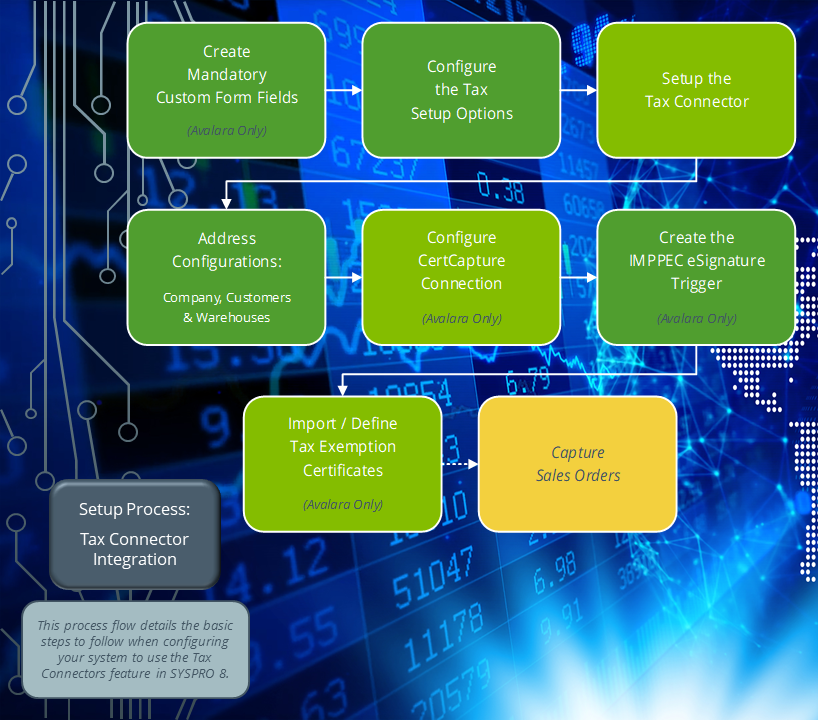
How do I configure a valid CertCapture Connection?
Ensure that you have a valid connection to CertCapture to avoid failed transactions when you add, change or delete a customer:
-
Open the Exemption Certificates Setup program (Program List > General Ledger > Tax > Tax Interface).
-
Capture your connection details.
With Syspro 8 2026 R1 and onwards you are required to select an environment (Production or Sandbox) and re-enter your password.
Login credentials are stored securely in Azure Key Vault. -
Select the Test Connection function to ensure all entries are valid.
-
Save and exit the program.
How do I import tax exemption state certificates?
If you have a list of existing tax exemption state certificates and want to import these into Syspro, proceed as follows:
-
Open the CertCapture Import program (Program List > General Ledger > Tax > Tax Interface).
-
Indicate the name and full location path of the import file.
-
Select the Import function.
-
Review the Process completed fields for summary information about the records imported.
Using
Referencing
Exemption Certificates listview
| Field | Description |
|---|---|
|
Certificate ID |
This indicates the unique identifier allocated to the certificate within CertCapture. |
|
Date created |
This indicates the date on which the certificate was created. |
|
Expiration date |
This indicates the date on which the certificate expires. |
|
File name |
This indicates the auto-generated file name of the certificate. |
|
Status |
This indicates the current status of the certificate. Complete - The certificate is validated and active. Pending - The certificate is awaiting validation. |
|
Exposure zone |
This indicates the states assigned for exemption against the certificate. |
|
Exemption reason |
This indicates the reason recorded for the exemption. |
| Certificate | Select the View hyperlink to open and download the documents attached to the certificate. |
| Request Exemption Letter | Select the hyperlink to begin the exemption application. The request is handled by email within the Avalara CertCapture portal. Once the certificate has been validated and created, it becomes visible in this program. |
Copyright © 2026 Syspro PTY Ltd.