Dimension Budgets Maintenance

This program lets you maintain budget values against a dimension category and code combination per period.
Exploring
 Where it fits in?
Things you can do in this program include:
-
Create multiple budgets for ledger codes and dimensions.
-
Copy dimension budgets from one period to another.
-
Import dimension budgets.
-
Delete dimension budgets.
-
Revise actual figures or budget figures by increasing or decreasing percentages.
-
Export budgets to Excel.
This program is accessed from the Program List of the Syspro menu:
- Program List > General Ledger > Dimension Anaysis > Setup
Terminology
Dimension accounting
Dimension accounting uses a standard chart of accounts for all segments of the business, which typically only consists of the natural account (i.e. the Ledger Code Details section of the GL structure definition).
All other attributes required for the analysis of financial data, are configured as dimensions.
Dimension category
Dimension categories are reporting levels that are defined according to the unique requirements of your business.
For example:
If your business wants to report financial data per branch, then you would create a Branch dimension category.
Dimension code
Dimension codes are reporting units that are configured against a dimension category (i.e. reporting level).
For example:
If your business wants to report financial data per branch, and your have branches in various cities, then each of these cities will be created as a dimension code.
To simplify the recording of dimensions against transactions, we suggest that you define default dimension codes against master data elements.
If a master data element forms part of a transaction, SYSPRO pre-populates the dimensions based on the defaults defined, resulting in minimal operator interaction.
Starting
Security
Groups
You can restrict operator access to programs by assigning them to groups and applying access control against the group (configured using the Operator Groups program).
Roles
You can restrict operator access to programs by assigning them to roles and applying access control against the role (configured using the Role Management program).
Configuring
The following configuration options in Syspro may affect processing within this program or feature, including whether certain fields and options are accessible.
Setup Options
The Setup Options program lets you configure how Syspro behaves across all modules. These settings can affect processing within this program.
General Ledger Codes
Setup Options > General Ledger Integration > General Ledger Codes
-
Dimension analysis
-
When this is defined as Transaction entry level:
Transactions are tagged with dimensions when posted in the sub module.
Sub-module tables will not be tagged with dimension codes.
-
When this is defined as GL entry level:
Transactions are tagged with dimensions when posted to the ledger.
-
-
Integration level
We recommend that the Integration level of all ledger codes you want included in Dimension Analysis is defined as Control account in detail.
General Ledger Preferences
Setup Options > Preferences > Financials > General Ledger
-
Budget descriptions
Solving
FAQs
Importing Dimension Budgets
Are dimension categories or codes validated when imported?
No.
We don't validate dimension categories or dimension codes and codes when importing dimension budgets using the Dimension Budgets Import program. We also don't validate the Active to and Active from dates on dimension codes that are specified within the Dimension Code Maintenance program.
Can I import dimension budget data by pasting from a spreadsheet?
Yes, you can. Keep the following in mind when importing using a spreadsheet:
-
Prepare your spreadsheet to have a similar structure as the following:
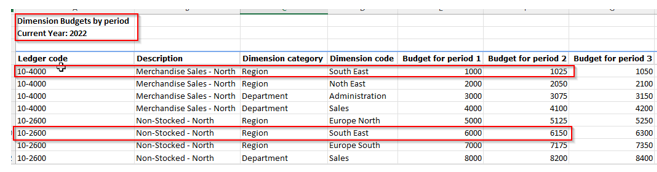
-
Select the Budget type before selecting the file you want to import.
-
All rows should contain valid data.
Using
Hints and Tips
-
Columns in a listview are sometimes hidden by default. You can reinstate them using the Field Chooser option from the context-sensitive menu (displayed by right-clicking a header column header in the listview). Select and drag the required column to a position in the listview header.
-
Press Ctrl+F1 within a listview or form to view a complete list of functions available.
File formats
The table below indicates the structure of the import file that must be defined to successfully import budgets from third party application software.
| Field | Start position | Field length and description |
|---|---|---|
| Header | ;SYSPRO IMPORT - Version=001 - GENP19 Mandatory entry of this comment on the first line of the import file to distinguish it from a SYSPRO 6.1 layout file. This comment is not case-sensitive. |
|
| Line type | 1 | 1 The first character of each line in the import file must start with the character B. |
| Ledger code | 2 | 35 Valid General Ledger account code. |
|
Dimension dategory |
37 |
20 Valid Dimension Category |
|
Dimension code |
57 |
20 Valid Dimension Code |
| Budget value 1 | 72 | 15 Budget amount for 1st ledger period |
| Budget value 2 | 87 | 15 Budget amount for 2nd ledger period. |
| Budget value 3 | 102 | 15 Budget amount for 3rd ledger period. |
| Budget value 4 | 117 | 15 Budget amount for 4th ledger period. |
| Budget value 5 | 132 | 15 Budget amount for 5th ledger period. |
| Budget value 6 | 147 | 15 Budget amount for 6th ledger period. |
| Budget value 7 | 162 | 15 Budget amount for 7th ledger period. |
| Budget value 8 | 177 | 15 Budget amount for 8th ledger period. |
| Budget value 9 | 192 | 15 Budget amount for 9th ledger period. |
| Budget value 10 | 207 | 15 Budget amount for 10th ledger period. |
| Budget value 11 | 222 | 15 Budget amount for 11th ledger period. |
| Budget value 12 | 237 | 15 Budget amount for 12th ledger period. |
| Budget value 13 | 252 | 15 Budget amount for 13th ledger period. |
| Budget value 14 | 267 | 15 Budget amount for 14th ledger period. |
Referencing
 Start Review
This displays data according to the selection criteria indicated. The function is enabled when you first load the program and then by selecting the Change Criteria option.
Change Criteria
This lets you change the currently configured review criteria.
Selection Criteria
| Field | Description |
|---|---|
|
Budget to maintain |
This defaults to , but you can maintain budgets for the next year and 8 alternate budgets. Current year
This is the default option and lets you maintain the dimension budget figures for the current financial year. Next year
This lets you maintain the dimension budget figures for the next financial year. Alternate budget 1 to 8
Select one of these alternate budgets to maintain additional budget figures. The wording for the Alternate budgets is displayed according to the wording defined at the Budget descriptions setup options (Setup Options > Preferences > Financials > General Ledger ). |
|
Revision level |
A reference of up to 15 characters can be entered here to indicate the latest revision level. |
|
Function |
Copy
This lets you copy an existing dimension budget. Delete
This lets you delete a dimension budget. Import
This lets you import a dimension budget using the Dimension Budgets Import program. |
|
Ledger codes |
This lets you select the ledger codes for which you want to maintain dimension budgets. |
|
Dimension categories |
This lets you select the dimension categories for which you want to maintain dimension budgets. |
|
Dimension codes |
This lets you select the dimension codes for which you want to maintain dimension budgets. |
|
Groups |
This lets you select the ledger groups for which you want to maintain dimension budgets. |
| Accounts to include | This lets you select which accounts you want to include when maintaining dimension budgets. |
Ledger Codes
| Field | Description |
|---|---|
|
Ledger code |
This indicates the ledger code for which you are maintaining the dimension budget amounts. |
|
Description |
This indicates the description of the ledger code. |
|
Dimension category |
This indicates the dimension category for which you are maintaining the dimension budget. |
Budgets
This listview displays the budgets for the ledger code selected in the Ledger codes pane. You can paste spreadsheet content or capture dimension budgets in the data grid.
| Field | Description |
|---|---|
|
Dimension category |
This indicates the dimension category for which you are maintaining the dimension budget. |
|
Description |
This indicates the description of the dimension category. |
|
Dimension code |
This indicates the dimension code for which you want to maintain dimension budgets. |
|
Period 1-14 |
This lets you enter budgets for the number of accounting periods in the year that are defined for your company at the Accounting periods setup option (Setup Options > Company > General). |
|
Total |
This indicates the total amount entered for each period. |
|
Ledger code |
This indicates the ledger code for which you are maintaining the dimension budget amounts. |
Copy Global Budgets
This window is displayed when you select the Copy option at the Functions field.
| Field | Description |
|---|---|
|
From budget |
|
|
Budget |
This lets you select which budget you want to copy. |
|
Budget selection |
This lets you select if you want to copy the budget for all ledger codes or for a single ledger code. |
|
Ledger code |
This indicates the ledger code from which you want to copy the dimension budget. This field is only available if you have selected Single at the Budget selection field. |
|
Dimension category |
This indicates the dimension category for which you are maintaining the dimension budget. |
|
Dimension code |
This indicates the dimension code from which you are copying the dimension budget. |
|
Apply percentage |
Select this to add a percentage adjustment to the copied budget. |
|
Percentage change |
This lets you specify the percentage you want to add. |
|
To budget |
|
|
Budget |
This lets you select to which budget you want to copy the amounts. |
|
Ledger code |
This indicates the ledger code to which you will copy the dimension budget. This field is only available if you have selected Single at the Budget selection field. |
|
Dimension category |
This indicates the dimension category for which you are maintaining the dimension budget. |
|
Dimension code |
This indicates the dimension code from which you are copying the dimension budget. |
Copy Budget
This window is displayed when you select the Copy Line option from the Context-senstive menu that is displayed when selecting a budget data record in the Budgets listview.
| Field | Description |
|---|---|
|
Apply percentage |
Select this to add a percentage adjustment to the copied budget. |
|
Percentage change |
This lets you specify the percentage you want to add. |
|
From dimension code |
This indicates the dimension code from which you are copying the dimension budget. |
|
To dimension code |
This indicates the dimension code to which you are copying the dimension budget. |
Distribute Values
This window is displayed when you select the Distribute option from the Context-senstive menu that is displayed when selecting a budget data record in the Budgetslistview.
| Field | Description |
|---|---|
|
Distribute by method |
Dividing amounts equally
This lets divide the amount entered at the Amount field evenly by 12 months in the year. Repeating amount across all periods
This lets you repeat the amount entered at the Amount field for each month. |
|
Amount |
Enter the budget amount you want to distribute. |
|
Total distributed |
This indicates the total amount distributed. |
| Budget spread |
This indicates the budget amount per month. |
Copyright © 2026 Syspro PTY Ltd.