Maintenance Labor Posting Capture

This program is used to allocate labor to planned and unplanned maintenance jobs.
This program is exclusively used for labor entries. Material is allocated to planned and unplanned maintenance jobs using the Maintenance Job Issues program.
Exploring

This program is accessed from the Program List of the Syspro menu:
- Program List > Enterprise Asset Management > Transaction Processing
Terminology
Enterprise Asset Management
Enterprise Asset Management (EAM) is a comprehensive approach to managing an organization's physical assets throughout their entire lifecycle, from acquisition to disposal. SYSPRO'S Enterprise Asset Management module focuses on the activities required to effectively manage the maintenance of machinery, parts, and other equipment to maximize their value, reduce costs, and ensure they contribute effectively to the organization's goals.
Planned maintenance
Planned maintenance within the Enterprise Asset Management module refers to scheduled maintenance activities that are pre-determined and performed at regular intervals using a planned schedule. This maintenance is carried out to prevent unexpected breakdowns and ensure continuous operation, regardless of the current condition of the asset.
Unplanned maintenance
Unplanned maintenance within the Enterprise Asset Management module refers to maintenance activities that are performed in response to unexpected equipment failures or breakdowns. These are unanticipated events that require immediate attention to restore the equipment's functionality. Unlike planned maintenance, unplanned maintenance disrupts normal operations and often incurs higher costs due to urgent repairs and unavailability of spare parts or resources.
Starting
Prerequisites
-
The Enterprise Asset Management module must be installed.
Security
eSignatures
You can restrict access to the eSignature transactions within a program at operator, group, role or company level (configured using the Electronic Signature Configuration Setup program).
Electronic Signatures provide security access, transaction logging and event triggering that gives you greater control over your system changes.
WIP Labor posting
Controls access to the posting of labor in the following programs:
- WIP Labor Import
- Labor Posting
- Maintenance Labor Posting Capture
Groups
You can restrict operator access to programs by assigning them to groups and applying access control against the group (configured using the Operator Groups program).
Roles
You can restrict operator access to programs by assigning them to roles and applying access control against the role (configured using the Role Management program).
Configuring
The following configuration options in Syspro may affect processing within this program or feature, including whether certain fields and options are accessible.
Setup Options
The Setup Options program lets you configure how Syspro behaves across all modules. These settings can affect processing within this program.
Work in Progress Preferences
Setup Options > Preferences > Manufacturing > Work in Progress
- Validate machine code
- Validate employee number
Solving

Why don't you drop us a line with some useful information we can add here?
Using
Process
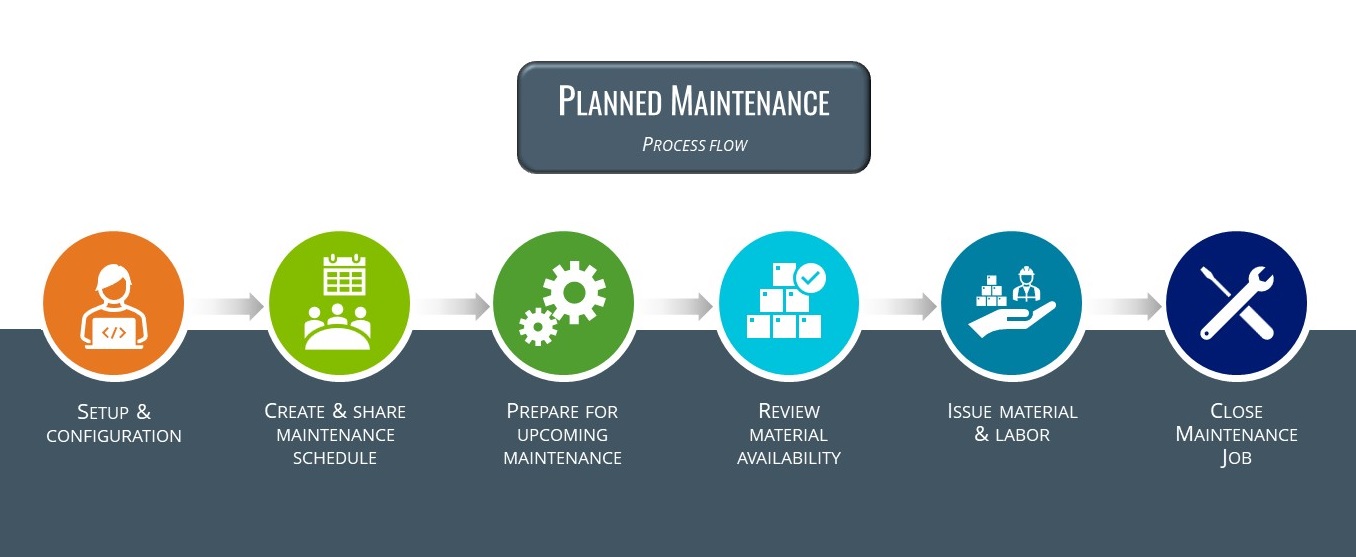
Planned Maintenance
-
Configure Planned Maintenance Structure
Once the Maintenance Engineer receives a new asset's details, the data to support the maintenance requirements need to be captured:
-
Equipment Type:
Define the types of equipment used within the business and the standard service structures for these equipments types using the Equipment Type Maintenance program.
This enables you to group different Equipment Codes and optionally set a default service structure per group.
-
Equipment Code:
Define the equipment codes to uniquely identify each asset or piece of equipment and link it to a machine, capex project or ledger code using the Equipment Code Maintenance program.
The equipment code is ultimately the master record against which all maintenance activities will be carried out.
-
Service Type:
Define the types of services that are required for every equipment type using the Service Type Maintenance program.
This enables you to supports different service scenarios.
For example:
15 000km service vs. 30 000km service.
-
Service Structure:
Configure the material and operational requirements for every asset and service type combination using the Service Structure Maintenance program.
-
-
Create & Share Planned Maintenance Schedule
Next, the Maintenance Planner will create the maintenance schedule, which is generated by combining the equipment code and service type. This can be set either manually or automatically using forward scheduling options.
Currently, only date-driven scheduling (not run-rate) is supported. For assets requiring service based on run-rate, estimate run times and schedule service dates accordingly.
-
Forward schedule maintenance jobs:
Create the maintenance schedule for each piece of equipment or asset using the Planned Maintenance Job Schedule program.
-
Communicate the schedule:
Share the maintenance schedule with engineers and production teams using the EAM List of Scheduled Jobs report.
-
-
Prepare for Upcoming Maintenance
Once the asset is loaded and its maintenance schedule planned, the maintenance engineer can then review upcoming jobs and their service needs in advance.
-
Use the Planned Maintenance Job Schedule program to assess the service requirements upfront in preparation for upcoming maintenance tasks.
You can also review job operations and related narrations, which can serve as service instructions.
-
-
Review Material Availability
Next, the parts requirements need to be reviewed, to ensure necessary spares are available for the upcoming maintenance jobs.
-
Review availability of materials required for the planned maintenance using the Maintenance Job Parts Review program.
-
-
Issue Material & Labor
The maintenance is then performed as scheduled, with the maintenance engineer issuing spares and labor to the maintenance job as needed.
-
Issue material to the planned maintenance job using the Maintenance Job Issues program.
Based on inventory management practices implemented, the materials can either be requested from inventory (which are then issued to the job) or as they are used.
To support both scenarios, spares can be issued either as a kit or specific issue.
If a kit is issued, unused spares may be returned, and the inventory team will return them to stock (i.e. negative issue).
-
Issue labor to the planned maintenance job using the Maintenance Labor Posting Capture program.
-
-
Close Maintenance Job
-
Once the service / maintenance job has been completed, the maintenance engineer must then close the job using the Maintenance Job Closure program.
-
Breakdown Maintenance
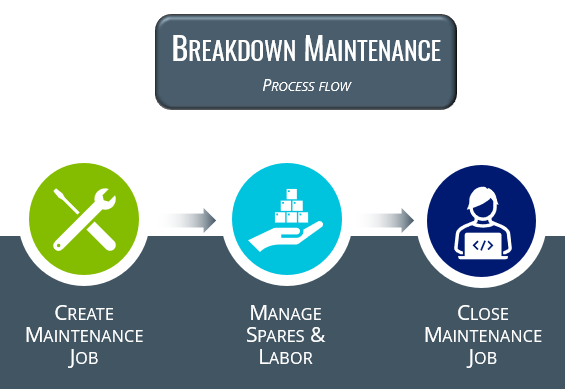
When assets break down, the maintenance engineer will typically investigate the issue and create the maintenance job, specifying spares requirements if known, or issuing spares as the work progresses.
-
Create Maintenance Job
-
Use the Maintenance Job Entry program to create an unplanned job for the maintenance required.
Material and operations can be added if known at the time.
-
-
Manage Spares & Labor
-
If material requirements were not known/captured upfront, issue material to the unplanned maintenance job using the Maintenance Job Issues program.
-
You can issue labor to the unplanned maintenance job using the Maintenance Labor Posting Capture program.
-
-
Close Maintenance Job
-
Once the service / maintenance job has been completed, the maintenance engineer must then close the job using the Maintenance Job Closure program.
-
Referencing
Job
This lets you select the maintenance job against which you want to allocate labor.
 Tracking
This lets you view details of all operations assigned to the current job using the WIP Browse on Operations Tracking program.
Change Period
This lets you change the financial period using the Request New GL Posting Period program.
Maintenance Labor Details
| Field | Description |
|---|---|
| Date |
This lets you select the transaction date, which is the system date by default, but can be changed. |
| Time |
This lets you select the transaction time. |
| Job |
Indicate the maintenance job against which you want to post labor. |
|
Dummy operation |
Select this option to post labor to a new operation immediately. This option can only be selected when all other operations against the job are complete. |
| Operation |
Indicate the operation to which labor posting must be allocated. The program automatically displays the first operation that is incomplete. If no incomplete operations exist for the job, then you can select the Dummy operation option to which labor can be posted. |
| Work center |
This indicates the work center where the maintenance is performed.
|
| Rate indicator | This lets you indicate the work center rate that is used for this operation. |
| Manual rate |
Select this option to enter a manual run rate for the operation. This overrides the work center run rate and all other rates will be zero when this option is selected. |
|
Run rate |
This field becomes available when you have selected Manual rate and lets you enter a manual run rate for the operation. |
| Machine |
This lets you select the machine that was used in the operation. This field is validated if the Validate machine code setup option is enabled (Setup Options > Preferences > Manufacturing > Work in Progress). |
| Employee |
This lets you select the employee who carried out the operation. This field is validated if the Validate employee number setup option is enabled (Setup Options > Preferences > Manufacturing > Work in Progress). |
| Employee rate indicator |
This lets you select the employee rate you want to use for this operation. If the selected employee rate is zero, then the maintenance labor posting will revert to the work center rates. |
| Run time |
This lets you indicate the time it takes to maintain one unit during full speed production. The run time forms part of the elapsed time. You can enter a negative value to reverse the issued run time. |
| Subcontract value |
This lets you enter the subcontract value for a subcontract operation. |
| Reference |
This lets you enter a 30-character reference for labor posting, which is displayed against the job transaction record and labor journal. |
| Notation |
This lets you enter a 50-character reference for labor posting, which is displayed against the job transaction record and labor journal. |
| Operation complete |
Select this option to indicate that the operation is complete. The completion date for an operation is set to the date on which the operation is marked as complete. If you post additional labor to a completed operation then you must mark the operation as complete again in order to update the completion date. |
Job Details
This pane displays information about the current maintenance job.
| Field | Description |
|---|---|
| Job | This indicates the job number. |
|
Operation |
This indicates the operation number for the maintenance job. |
| Operation description | This indicates the description of the operation. |
|
Equipment code |
This indicates the code of the equipment that was maintained against the job. |
|
Equipment code description |
This indicates the description of the equipment. |
|
Maintenance service type |
This indicates the type of maintenance service that was carried out on the equipment code. |
|
Equipment type |
This indicates the type of equipment that was maintained against the job. |
|
Equipment type description |
This indicates the description of the equipment type. |
|
Maintenance job type |
This indicates whether the maintenance job was planned or unplanned. |
|
Type of service |
This indicates the type of service or maintenance that was done, e.g. plant maintenance or other asset maintenance. |
| WIP branch | This indicates the WIP branch that is specified for the job. |
|
Current WIP branch |
This indicates the WIP branch of the current operation or work center. This applies when the Work in Progress module is integrated to the General Ledger at WIP branch level, as defined at the Apply integration level at setup option (Setup Options > General Ledger Integration > General Ledger Codes). |
|
Rate details |
This indicates the run and employee rate. |
|
Posting month |
This indicates the month to which the labor transaction is posted. You can post labor to the current month, previous month 1 or previous month 2. |
|
Posting year |
This indicates the financial year to which the labor transaction is posted. |
Posted items
This pane displays information about the posted labor transactions.
| Field | Description |
|---|---|
| Job | This indicates the job number. |
|
Operation |
This indicates the operation number for the maintenance job. |
|
Work center |
This indicates the work center of the operation. |
|
Run time |
This indicates the entered run time. |
|
Journal |
This indicates the journal number of labor posting transaction. |
Additional fields
This pane allows you to capture custom forms for WIP job postings.
Copyright © 2026 Syspro PTY Ltd.